
Rules, suppressions and learnings ​
You can teach CodeLotse what your team expects and what it accepts. Rules add expectations that reviews check. Learnings describe accepted practice, so reviews stop reporting it. Suppressions hold back findings or labels that people dismissed most of the time. Rules and learnings are written by people; suppressions are proposed by CodeLotse and activated by people.
Where rules come from ​
| Source | Applies to | Managed by |
|---|---|---|
| Rules in the sidebar | Every repository of the organisation | Organisation administrators |
| The Rules tab of a repository | That repository | Maintainers and administrators |
rules in .quavon/config.yml | That repository | Anyone who can change the default branch (Repository configuration) |
Rule files: AGENTS.md, CLAUDE.md, .cursorrules, .cursor/rules/*.mdc, .github/copilot-instructions.md, .github/instructions/*.instructions.md | That repository, or the files below the directory of the rule file | Anyone who can change the default branch |
Rule files and .quavon/config.yml are read from the base commit of the pull request, so a pull request cannot change the rules that review it. A rule from a rule file can be switched off with disable in .quavon/config.yml.
Findings that break a rule have the category Rule, and their comment names the rule and where it comes from.
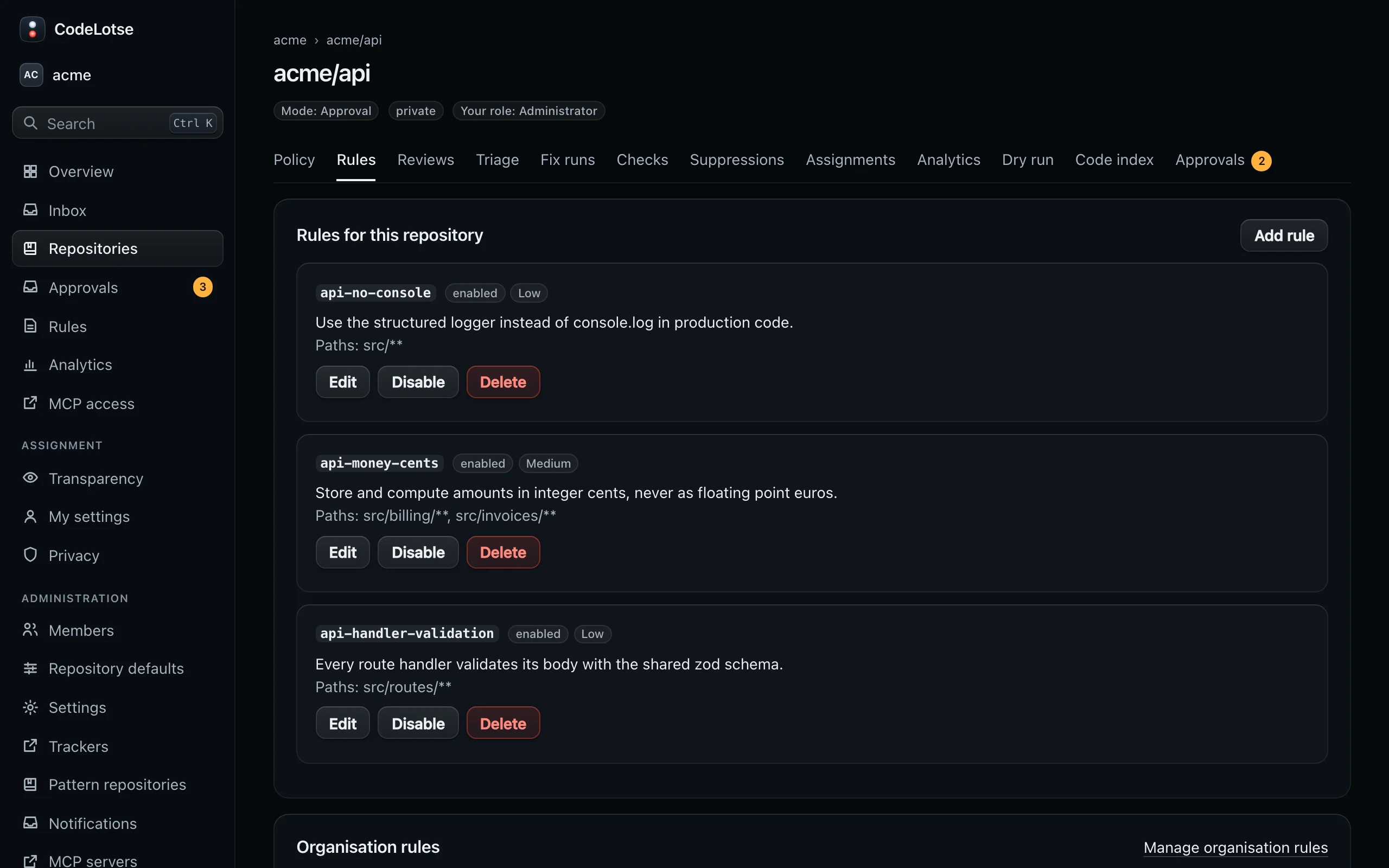
Read the Rules tab ​
The Rules tab of a repository has three parts:
- Rules for this repository: rules and learnings created in the web app, with proposals waiting for a decision. The tab shows how many proposals wait.
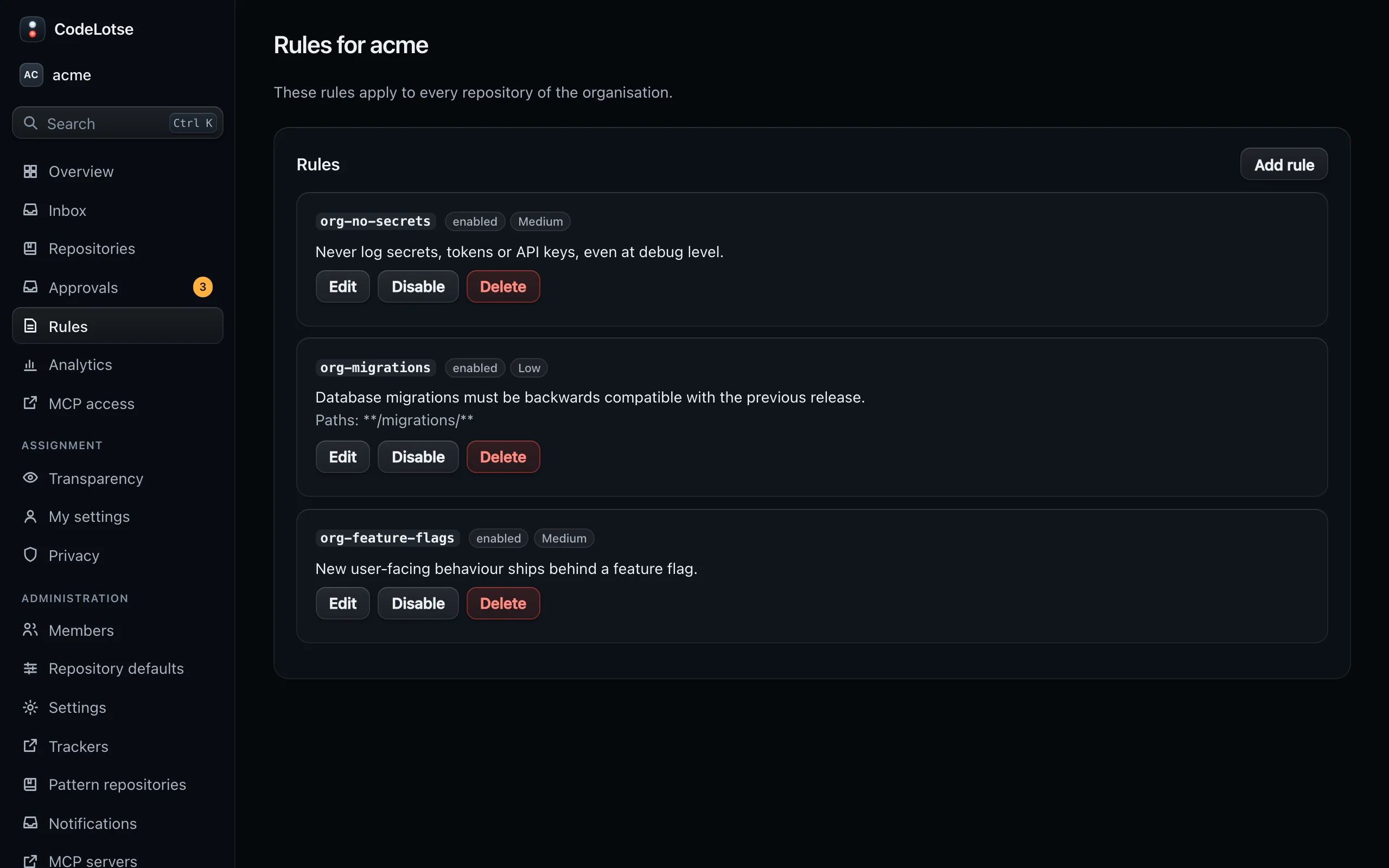
- Organisation rules: the rules that apply to every repository, with a link Manage organisation rules for administrators.
- Rules from repository files: the rules the last review read from
AGENTS.mdand similar files, with the pull request it came from.
The Rules applied section of a review run lists every rule that run used.
Add a rule or learning ​
- Open the Rules tab of the repository, or Rules in the sidebar for the whole organisation.
- Select Add rule.
- Choose the Type: Rule or Learning.
- Write the Rule text. Keep it to one expectation, for example "Database access goes through the repository layer. Flag raw SQL in handlers."
- Optionally limit it with Paths, one glob pattern per line, and give a Severity hint for findings that break it.
- Leave Enabled ticked and save.
Edit, Disable or Delete a rule at any time. Changes apply to the next review.
Learnings ​
A learning states accepted team practice and its reason, for example "Raw SQL is allowed in migrations because they run once by hand". Reviews leave out findings that a learning explicitly allows. A learning never removes security findings of high or critical severity.
Learnings arrive in three ways:
- created on the Rules tab with the type Learning;
- proposed with
@codelotse learn …in a pull request comment (Commands); - proposed from a reply to a CodeLotse finding that explains a lasting practice, when learning from feedback is not Off (Learning from replies).
Proposals show the badge proposed and where they came from, for example "From a reply on #42 by @octocat". A maintainer chooses Activate, Edit or Reject. Only active learnings are used by reviews and dry runs.
Ignore one finding ​
To silence a single finding on one pull request, reply to it with @codelotse ignore. Later reviews of that pull request mark it as suppressed. High and critical security findings cannot be ignored.
Suppressions ​
CodeLotse watches how people respond to its comments and labels. When a group of findings or labels is dismissed most of the time, it proposes a suppression for that group:
| Matches | Example |
|---|---|
| Same finding | One finding that keeps coming back |
| Rule … under … | Findings of one rule under a path |
| … findings under … | Findings of one category under a path, for example Style findings under src/legacy/ |
| Label … | One triage label |
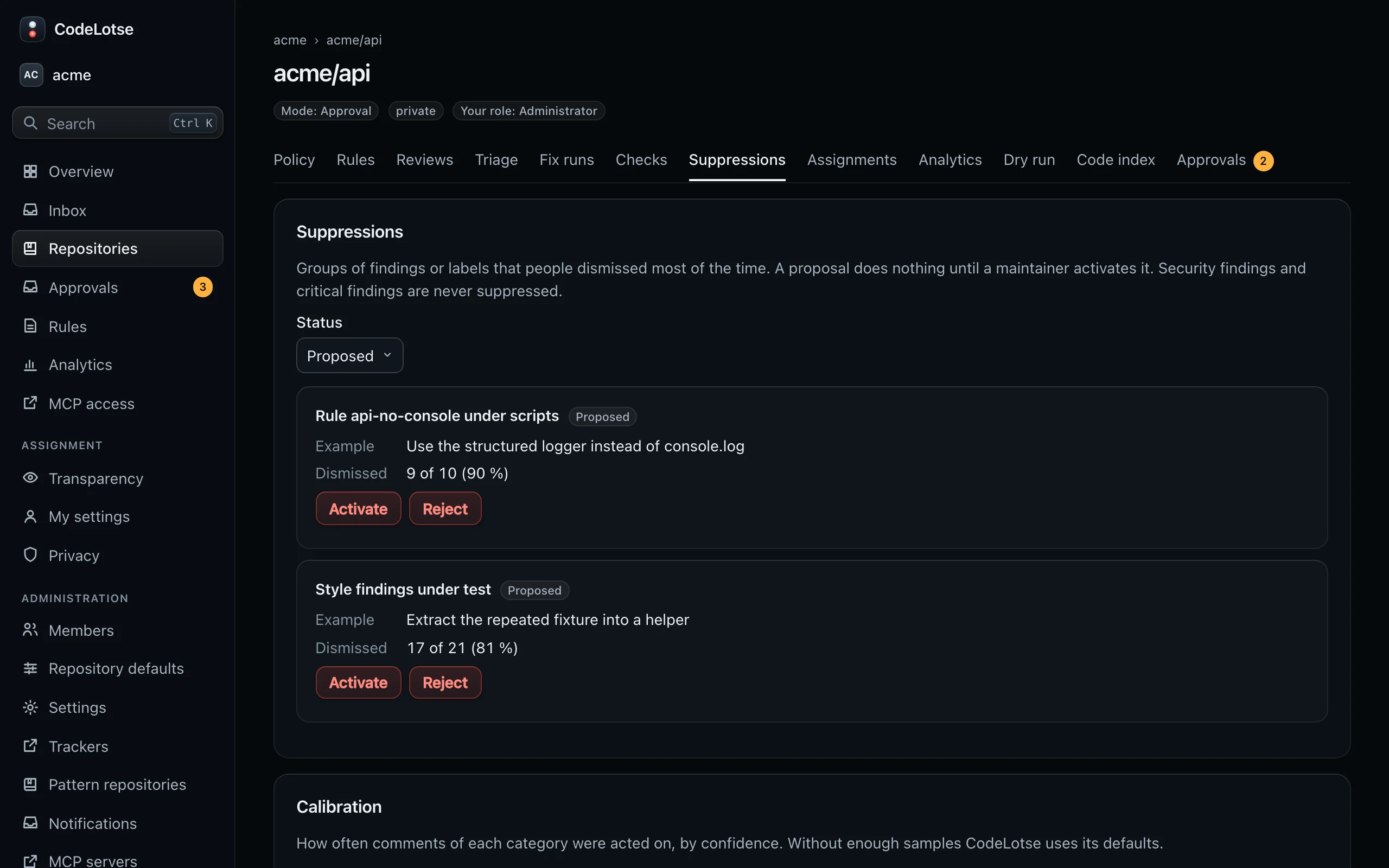
A proposal does nothing until a maintainer activates it. Security findings and critical findings are never suppressed.
Decide on a proposal ​
Open the Suppressions tab of the repository. Filter by status (Proposed, Active, Rejected, Expired). Each row shows what it Matches, an Example, how often it was Dismissed (for example "8 of 10 (80 %)"), when it Expires and who decided.
- Activate: the suppression applies to later reviews and triage until it expires, 90 days by default.
- Reject: the proposal is closed and nothing changes.
- Expire: ends an active suppression now.
Every decision is recorded in the audit log.
Calibration ​
Below the suppressions, Calibration shows how often comments of each category were acted on at each confidence, for the repository and the organisation. Once there are enough samples, CodeLotse ranks findings by this calibrated confidence. Without enough samples it uses its defaults.
Learning from feedback ​
The repository policy section Learning from feedback controls all of this:
| Setting | Default | Meaning |
|---|---|---|
| Learning mode | Shadow | Off reads no feedback. Shadow records calibrated scores and would-be suppressions only. On uses them for ranking and applies suppressions you activated. |
| Minimum samples per group | 10 | How many responses a group needs before a suppression is proposed. |
| Dismissal rate that proposes a suppression | 0.7 | Share of dismissals that triggers a proposal. |
| Days until an activated suppression expires | 90 | Lifetime of an active suppression. |
CodeLotse reads the responses 14 days after a pull request or issue opens and when it closes. What counts: resolved threads with or without a change, committed suggestions, ignore commands, rejected approvals, removed triage labels and, on private and internal repositories, thumbs-up and thumbs-down reactions. Only people with write access count as dismissing. Feedback never trains a model and never leaves your organisation.