
Issue to pull request ​
A maintainer can ask CodeLotse to fix an issue. The fix agent plans a change, edits the code in a throwaway sandbox, runs your setup, test and lint commands, and, if everything passes the checks, opens a draft pull request for your team to review. Every attempt is a fix run you can follow in the web app.
Before you start ​
Draft fixes need all of these. An administrator sets them up once:
- GitHub. Fix runs work on GitHub and GitHub Enterprise Server only.
- The fixer app. A second GitHub App with write access to code, installed on the repositories that use fixes. The overview shows "The fixer app is available." when it is ready (Instance administration).
- A sandbox runner. The overview shows how many runners are online (Sandbox).
- Draft fixes turned on in the repository policy, with the commands your project needs (Repositories and policy).
Ask for a fix ​
There are three ways to start a fix run:
| Trigger | How |
|---|---|
| Command | Comment @codelotse fix on the issue. Can be turned off with Allow the fix command in issue comments. |
| Label | Add a trigger label to the issue. The default label is quavon:fix; administrators set others under Trigger labels. |
| Web app | Fix or Apply fixes on a review run, for the findings of a pull request (see below). |
You need write or admin access to the repository. The issue must be open, no other fix for it may be running, and the daily limits must allow it (5 runs per repository and 2 per issue by default). Bots cannot start fixes.
CodeLotse does not comment when it does not attempt a fix. The reason appears on the fix run.
What the fix agent does ​
- Eligibility. CodeLotse checks the trigger, the person, the issue, the limits and the budget.
- Plan. The agent reads the issue and the repository and writes a plan: steps, files and risks.
- Change. It edits files in memory. The setup, test and lint commands of the policy run in the sandbox with the chosen image (Node.js, Python or Go), with no network unless package registries are allowed.
- Validation. Outside the sandbox, CodeLotse checks the patch: the number of changed files and lines, allowed and denied paths, protected paths such as CI configuration, and lock files.
- Publication. In Approval mode the draft waits in Approvals, where you see the branch, changed files and diff. Approving opens a draft pull request from a new branch. In Automatic mode the draft pull request is opened at once, except on public repositories, where it always waits for approval.
The sandbox never sees your database, encryption keys or code host tokens. The draft pull request's branch runs your CI workflows, including their repository secrets, so review it like any contribution. The design and its limits are in the threat analysis.
Follow a fix run ​
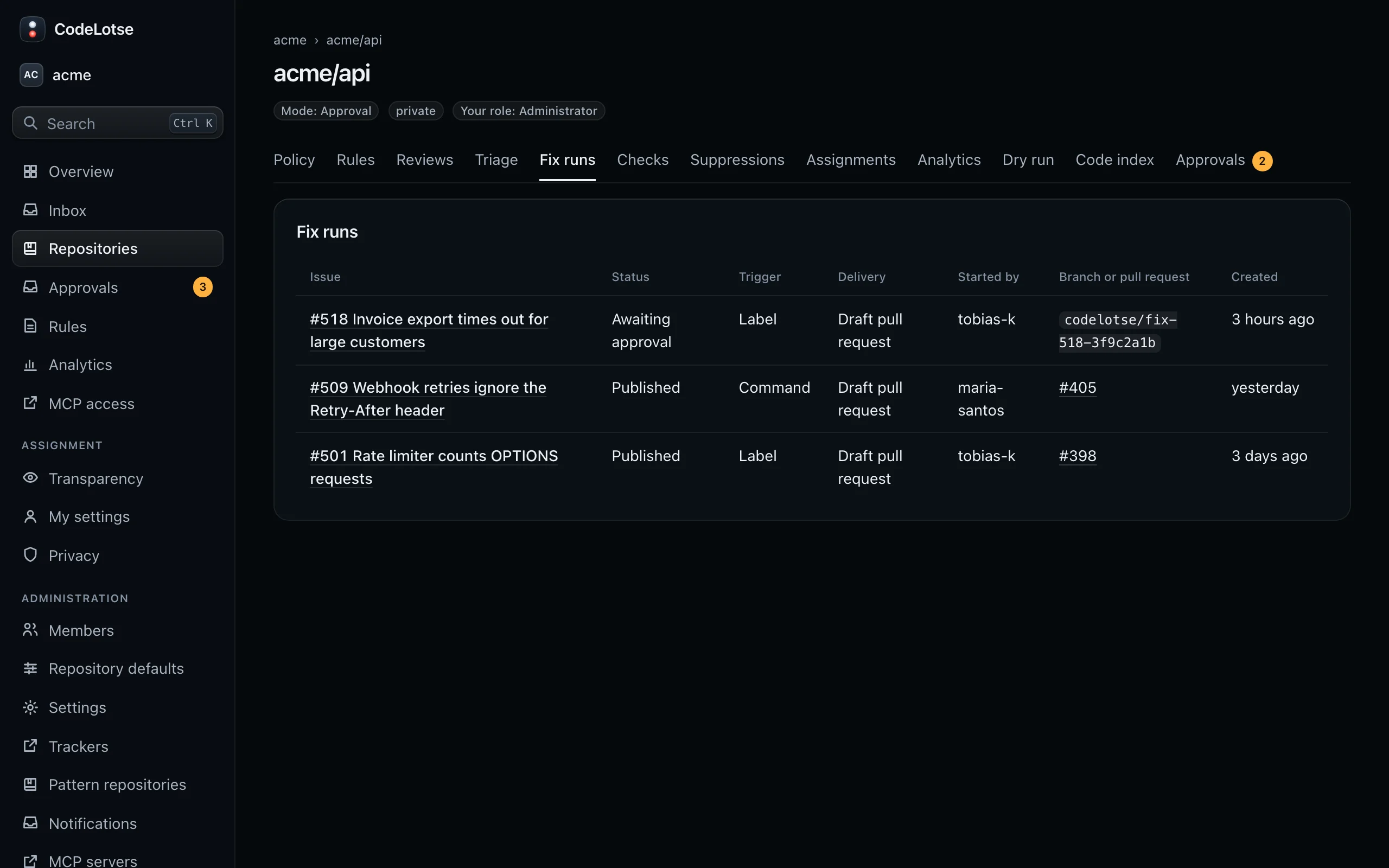
The Fix runs tab of a repository lists every run with the Issue, Status, Trigger (Label, Command or Web app), Delivery, who Started by, the Branch or pull request and when it was Created.
| Status | Meaning |
|---|---|
| Received | The run is queued. |
| Not eligible | No fix was attempted; the run explains why. |
| Running | The agent is working. |
| Validated | The patch passed the checks. |
| Rejected | The patch broke a rule, for example a denied path or too many changed lines. |
| Shadow only | The fix exists in CodeLotse only, because the mode is Shadow. |
| Awaiting approval | The draft waits in Approvals. |
| Publishing, Published | The pull request or commit is being created, or exists. |
| Failed, Expired | The run broke off, or the approval expired. |
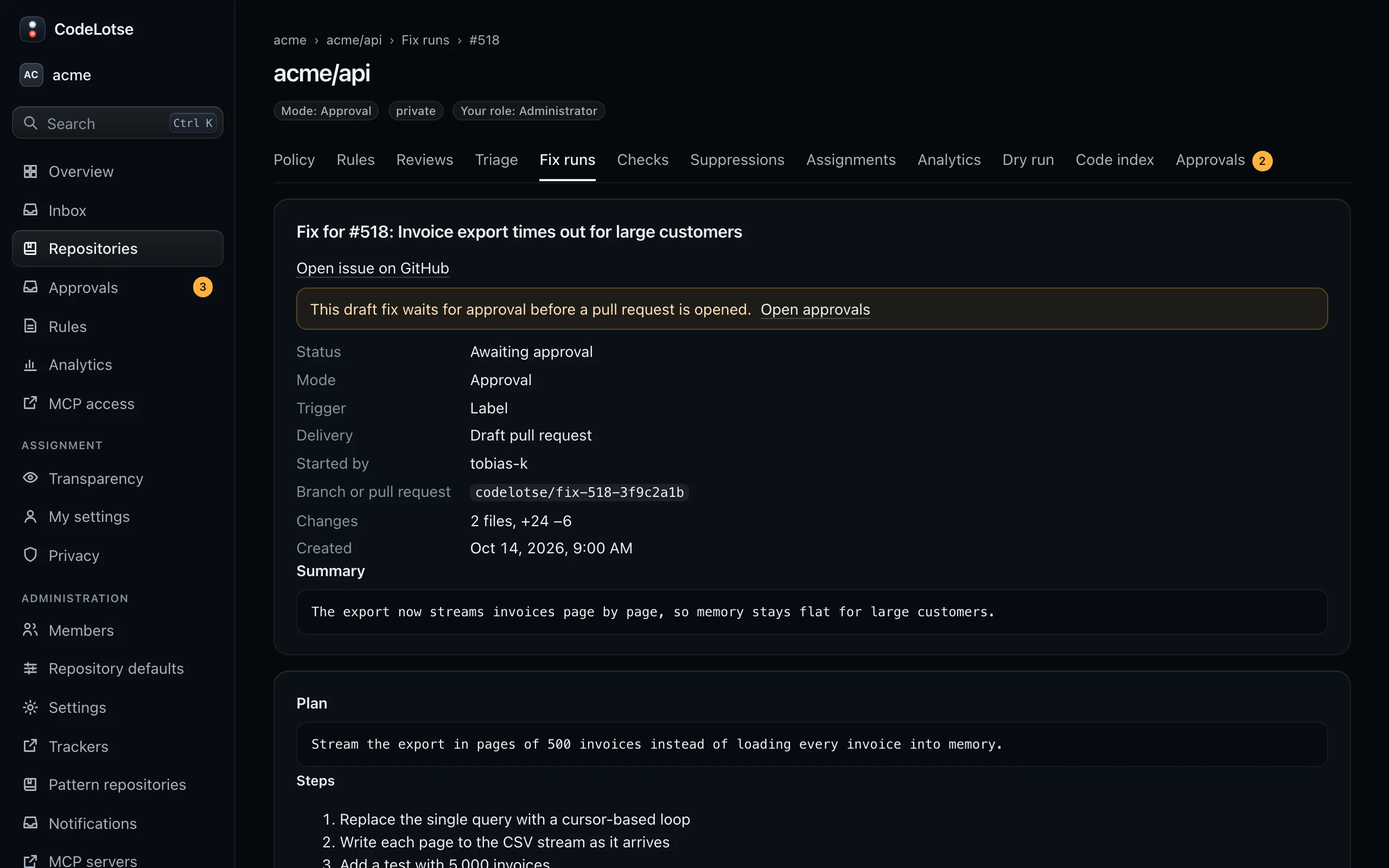
Select a run to open it, titled "Fix for #" and the issue. It shows the status, mode, trigger, delivery, who started it and the result, the size of the change, and:
- Why no fix was attempted, for runs that were not eligible, such as "The issue is too unclear to fix." or "No sandbox runner is available.";
- Plan with Steps, Files and Risks;
- Test results of the test and lint commands with exit code and duration;
- Patch violations, if the patch broke a rule;
- the Patch itself.
Fix the findings of a review ​
When an administrator turns on Fixes for review findings, maintainers can fix findings from a review run: Fix on one finding or Apply fixes for up to 20 published findings, most severe first. The result is delivered as a Stacked pull request into the pull request's branch, or as one Commit to the pull request branch where the policy allows it.
This needs an open pull request from the same repository whose head has not moved since the review, and you must be signed in with your code host account. The option stays unavailable, with a notice on the policy page, until the security sign-off for review fixes is recorded. See Fixes for review findings.