
Pull request reviews ​
CodeLotse reviews every pull request of a repository whose review mode is not Off. This page explains what the review looks like on the code host, how incremental reviews and resolved threads work, and how to read a review run in the web app.
When a review runs ​
- when a pull request is opened, and again on every new commit;
- when a draft pull request is marked ready for review (drafts themselves are reviewed only when Review draft pull requests is on);
- when someone with write access writes
@codelotse re-review(Commands in comments).
Binary files, removed files, lock files, generated files, files that match an ignored path and files that do not fit the token budget are not reviewed; the review lists them.
What happens with the result depends on the mode of the repository: Shadow keeps it in the web app, Approval puts it into Approvals, Automatic posts it at once (Modes).
What you see on the pull request ​
The examples are for GitHub; other code hosts show the same content in the closest form they support (feature parity).
The summary ​
CodeLotse posts one review with a summary comment. It contains, from top to bottom:
- The state line, for example "Changes needed: 1 finding to fix before merge, 2 worth a look." or "No issues: nothing to fix." The words follow the organisation's terminology.
- Summary: what the change does and what the findings mean. Collapsed by default; an administrator can show it open or turn it off. When Add a flow diagram to the summary is on, it can include a small diagram of the runtime flow.
- Not posted inline: findings that could not be attached to a line of the diff.
- Files not reviewed: changed files the review skipped.
- Prompt for your coding agent (all findings): a ready-made prompt you can paste into Cursor, Claude Code, Codex or another agent.
- The footer, by default "Automated review by CodeLotse".
When the review finds nothing worth reporting and Stay quiet when nothing is found is on (the default), no comment is posted. Only the status on the head commit shows that the pull request was reviewed.
Inline comments ​
Each finding becomes a comment on the lines it is about:
**HIGH** · security · Webhook signature is not verified

The handler parses the body before it checks the signature header ...

Team rule: Every webhook handler verifies the signature first.- The first line holds the severity, the category and the title. Findings from deterministic scanners also show "deterministic" and the tool name.
- A rule citation names the team rule or the rule file and line that the change breaks.
- Suggested changes appear as a one-click suggestion you can commit from the code host, when CodeLotse can prove which lines the change replaces. Otherwise the code is shown as a plain block with a note to check it (Suggested changes).
- A collapsed Prompt for your coding agent holds a prompt for this one finding.
At most Maximum comments findings are posted per review (10 by default), most important first. Findings below the Minimum severity or Minimum confidence of the policy are kept in the web app only.
The status on the head commit ​
CodeLotse reports a status named CodeLotse on the head commit when Report a check run is on (the default). On GitHub it is a check run whose title repeats the state line, with a table of findings per severity and an annotation per finding. When the pull request links an issue with acceptance criteria, the check also shows the acceptance criteria check.
The check is neutral by default, so it never blocks a merge. When an administrator turns on Fail the check on critical findings, it fails while a critical finding is open, and branch protection can then block merging.
New commits and resolved threads ​
- With Review only new commits on (the default), a new commit is reviewed against what was already reviewed. Findings that were already posted are not posted again.
- When a later commit fixes a finding, CodeLotse resolves the comment thread of that finding. This happens when the review is posted automatically; reviews that go through approval do not resolve threads.
- If the pull request receives another commit before a review is posted, the older review is skipped.
Other things a review can post ​
| Setting | Effect |
|---|---|
| Comment on the pull request when the first review starts | A short comment that a review is coming. Off by default. |
| Pull request description | A marked block in the description that summarises the change. Off by default (Pull request descriptions). |
| Deterministic checks | Scanner findings in the review and, on GitHub, an upload to code scanning (Checks). |
Respond to a review ​
- Reply to a finding with a command:
explain,why,fixorignore, or ask a question when free-form questions are allowed (Commands in comments). - Commit a suggestion or fix the code and push. The next review resolves the thread when the problem is gone.
- Resolve a thread, or react with thumbs up or down on a private repository. CodeLotse counts this as feedback and uses it for learning.
- If a pattern is fine in your codebase, propose a learning with
learnso later reviews leave it out.
Find reviews in the web app ​
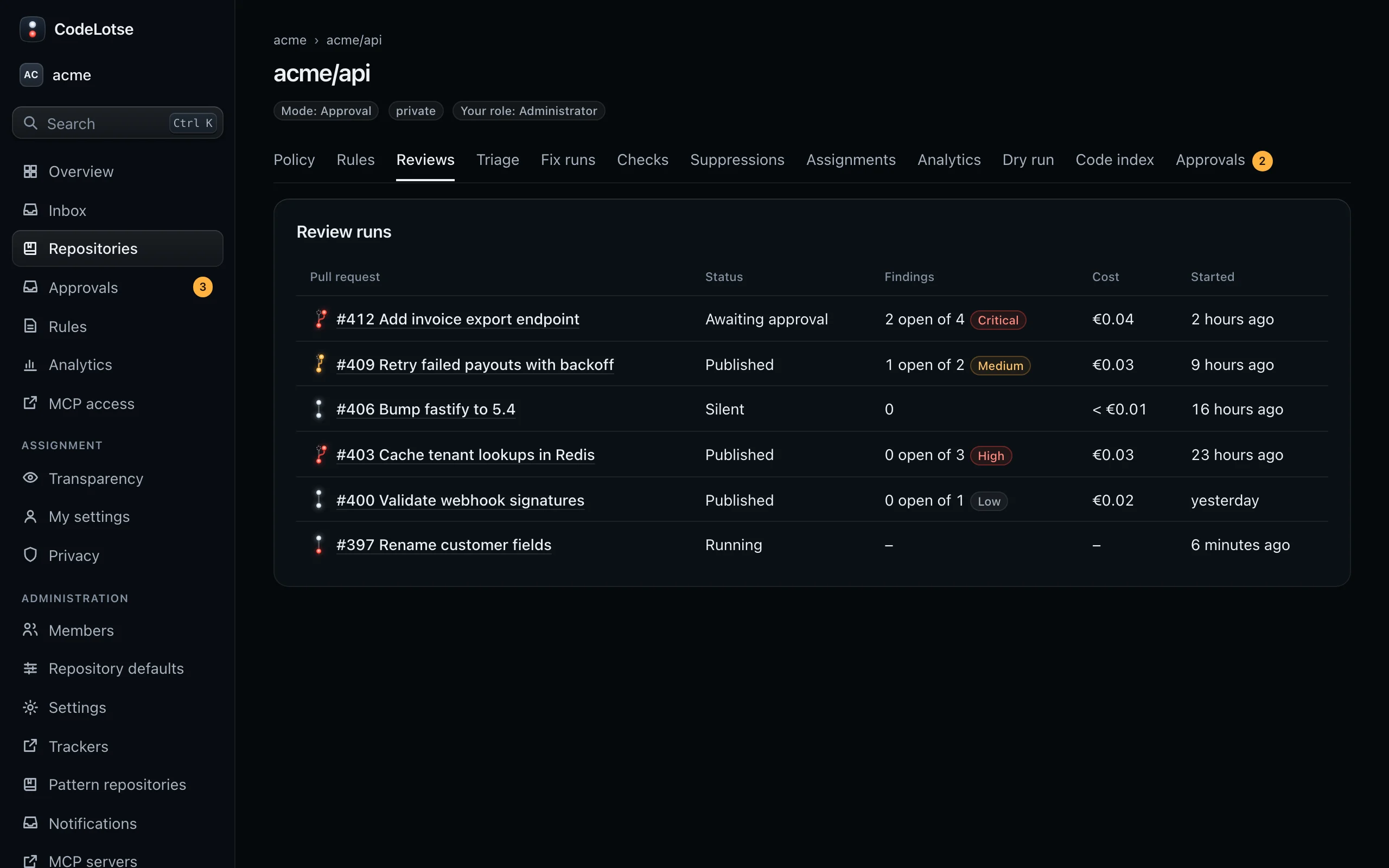
Open a repository and choose the Reviews tab. Review runs lists every review with the pull request, its Status, the open and total Findings, the Cost and when it Started. Load more shows older runs.
| Status | Meaning |
|---|---|
| Running | The review is in progress. |
| Completed | The review finished and has a result. |
| Nothing to report | The review finished without findings worth posting. |
| Failed | The review stopped before it finished, for example because of a model error. |
| Skipped | Nothing was reviewed for this commit, for example a draft or a change to ignored files only. |
Read a review run ​
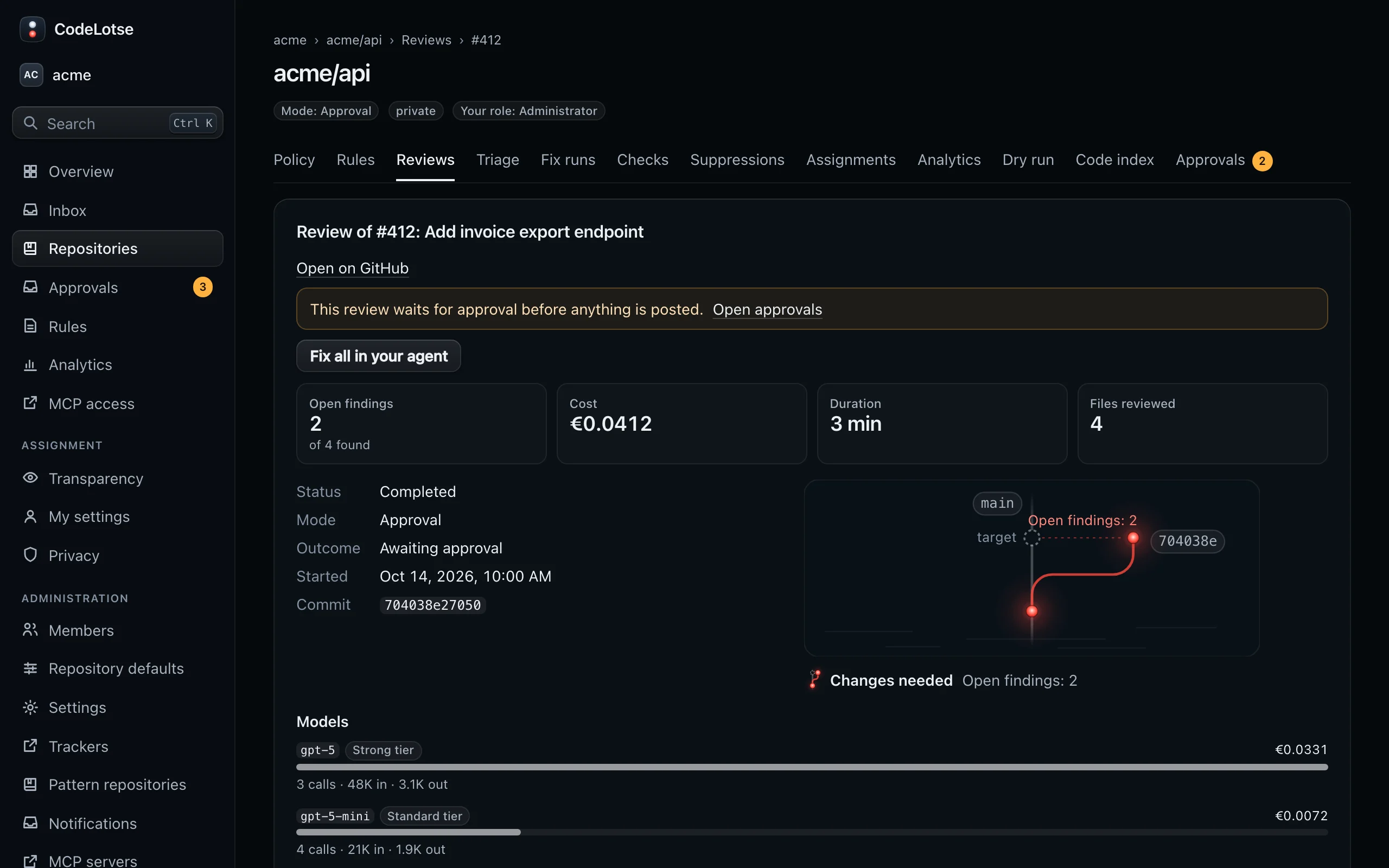
Select a pull request to open its review run, titled for example "Review of #42: Add billing endpoint". It shows:
- Open on GitHub and, while the run waits for approval, a link to Open approvals.
- The light code of the run with the number of open findings, and the figures Open findings, Cost (or Cost so far while running), Duration and Files reviewed.
- Status, Mode, Outcome (Published, Awaiting approval, Shadow only or Silent), Started, the Commit and, when used, External context.
- The Summary and, if the description feature is on, the Pull request description with a suggested title.
- Findings: switch between Open and All, and filter by Severity and Category. Findings are grouped by file. Each shows its confidence, the rule it cites, the Suggested change with Copy suggestion, and the verifier's note.
- Models: every model the run called, with tier, number of calls, input and output tokens and cost.
- Review details: Files not reviewed, Files reviewed and Rules applied.
Actions on a review run ​
| Action | Who | Effect |
|---|---|---|
| Fix in your agent, Fix all in your agent | Everyone | Opens a prompt for Cursor, Claude Code, VS Code or Codex, or to copy (Fix in your coding agent) |
| Fix, Apply fixes | Maintainers and administrators, when fixes for review findings are on | Asks the fix agent to fix one finding or all of them (Issue to pull request) |
| Run review again | Maintainers and administrators, on failed or skipped runs | Reviews the same commit again. Also in the command menu. |