
Assignment and privacy ​
Reviewer and assignee suggestions process data about people, so CodeLotse puts several gates in front of them: a legal sign-off for the instance, the employment and works-council answers of the organisation, and per-repository settings. This page walks an organisation administrator through them. What people see and can set for themselves is in Reviewer suggestions; the full reference is Assignment and the design is ADR-0014.
How the gates work ​
The mode you set in a repository's policy is the requested mode. The effective mode is the lowest mode every gate allows:
| Gate | Effect when it is not met |
|---|---|
| Legal sign-off recorded by the instance administrator | At most Shadow |
| The sign-off permits the mode | At most the highest permitted mode |
| High-risk classification without a completed conformity assessment | Suggest for now, later Shadow |
| Works-council mode without a recorded works agreement | Off |
| The works agreement does not permit apply | At most Suggest |
| Deployer attestation (cloud edition) | At most Shadow |
| Apply opt-in for the repository | At most Suggest |
The policy page of each repository shows the requested and effective mode and lists the reasons under Assignment: effective mode. Everyone in the organisation can see the mode per repository on the transparency page.
1. Get the legal sign-off ​
An instance administrator records counsel's classification of the feature under the EU AI Act on the instance page Legal sign-off: the outcome (A, B or C), the permitted modes, a document reference and the date. Until then, every repository runs in shadow at most. See Instance administration and the legal assessment that counsel completes. In the cloud edition, the operator records it.
2. Answer the privacy questions ​
Open Assignment › Privacy in the sidebar. The page is titled "Assignment & privacy for" and the organisation name.
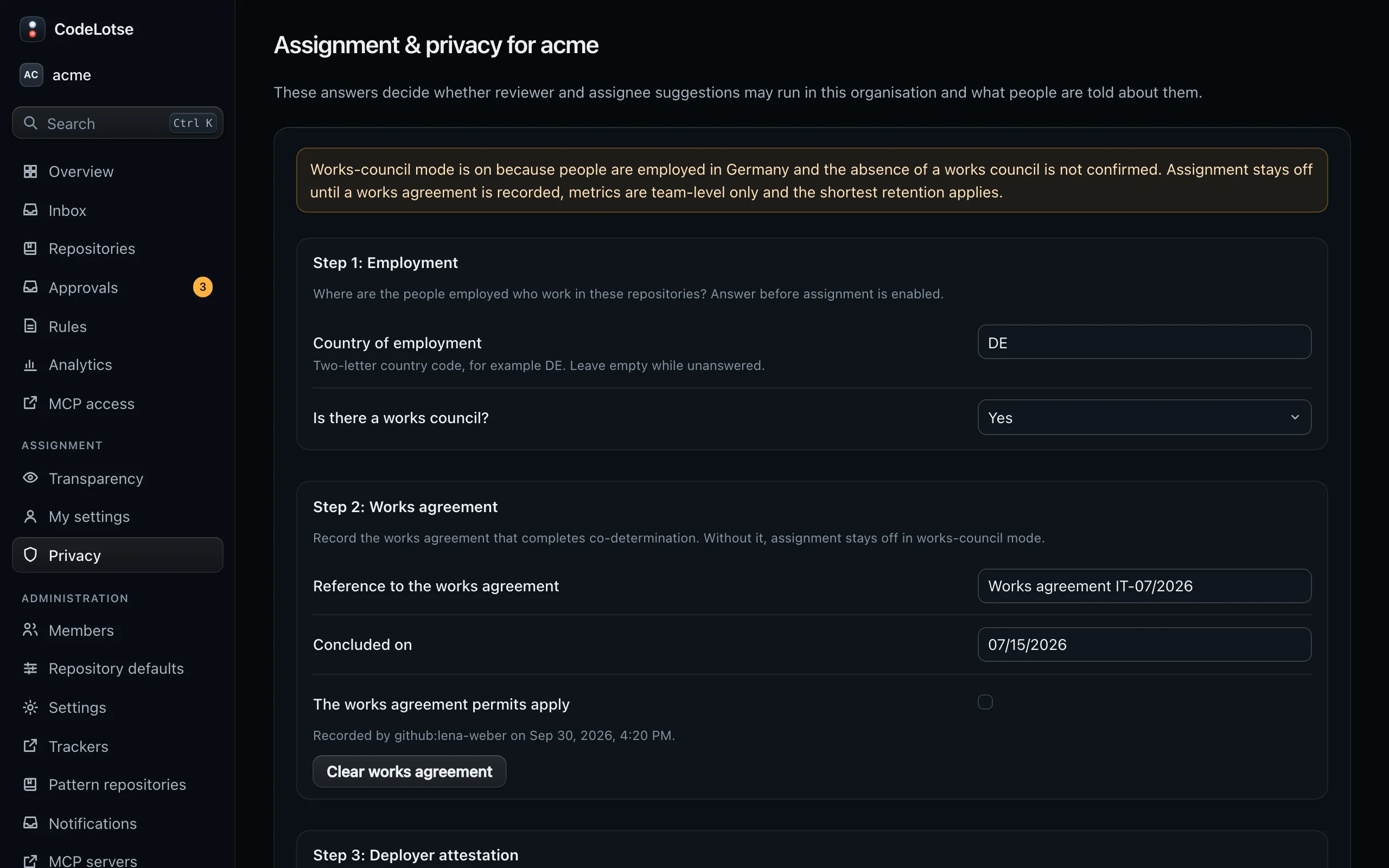
| Step | Fields |
|---|---|
| Step 1: Employment | Country of employment as a two-letter code, for example DE, and Is there a works council? (Yes, No, Not known). For employees in Germany without a works council, tick I confirm that no works council exists for these employees; the confirmation is recorded with your name. |
| Step 2: Works agreement | Reference to the works agreement, Concluded on and The works agreement permits apply. Clear works agreement removes it. |
| Step 3: Deployer attestation | A data protection impact assessment is completed and Employees and their representatives are informed. Both are needed in the cloud edition. |
| Step 4: Retention | Days to keep assignment records and explanations (default 183), out-of-office periods after their end (default 30) and reassignment feedback (default 183). |
| Comments | Comment language of the suggestion comments, English or Deutsch. |
| Step 5: Transparency | Responsible contact, shown to every member, and Team-level metrics only, which turns off every per-person view and export. |
The top of the page says whether works-council mode is on. It is on while the employment questions are unanswered, and when people are employed in Germany and the absence of a works council is not confirmed. In works-council mode, assignment stays off until a works agreement is recorded, metrics are team-level only and the shortest retention applies.
Templates for the works agreement and the impact assessment are in the compliance pack: Anlage zur Betriebsvereinbarung and DPIA for assignment.
3. Configure repositories ​
In each repository's policy (or in Repository defaults), the section Assignment holds:
| Setting | Default | Meaning |
|---|---|---|
| Assignment mode | Off | Shadow stores suggestions for instance administrators only; Suggest shows them on the Assignments tab and optionally as one comment; Apply requests reviewers and sets assignees. |
| Suggest | Both | Reviewers for pull requests, Assignees for issues. |
| Reviewers per pull request, Assignees per issue | 1, 1 | How many people to suggest. |
| Post suggestions as one comment | Off | Names the people as code, so nobody is notified. |
| Team-level metrics only for this repository | Off | Turns off per-person views for this repository. |
| Maximum open assignments per person | 5 | Open work lowers how often a person is suggested, step by step up to this number, where the workload weight counts fully. |
| Share of suggestions that spread knowledge | 0.2 | Between 0 and 0.5. |
| Pairing | Pair a newcomer with an expert | Or No pairing. |
| Never suggest these logins | none | One login per line, for example bots or people on leave. |
| Weights | Code ownership, earlier and recent work on the files, current workload, availability, spreading knowledge. |
Start with Shadow or Suggest. Suggestions name the people and the facts behind them; no scores or rankings are shown.
4. Opt in to apply ​
Apply needs an explicit opt-in per repository. On the repository's Policy tab, under Assignment: effective mode, select Enable apply…, read the statement and select Confirm and enable apply. The opt-in is recorded with your name and audited. Disable apply withdraws it. Saving the policy never changes the opt-in.
What people control themselves ​
Everyone can opt out without giving a reason, decide whether their open work appears in the workload view, and share availability or not. Opt-outs are invisible to others, including administrators. See Reviewer suggestions.