
Models and keys ​
CodeLotse calls language models with keys your organisation provides. You add the keys once, then route each tier of work to a key and a model, optionally with a budget. All of this is under Administration › Settings, in the sections Language model credentials and Model routing, and needs the organisation administrator role. Providers, endpoint presets, model listing and routing internals are described in Model credentials and routing.
Add a model key ​
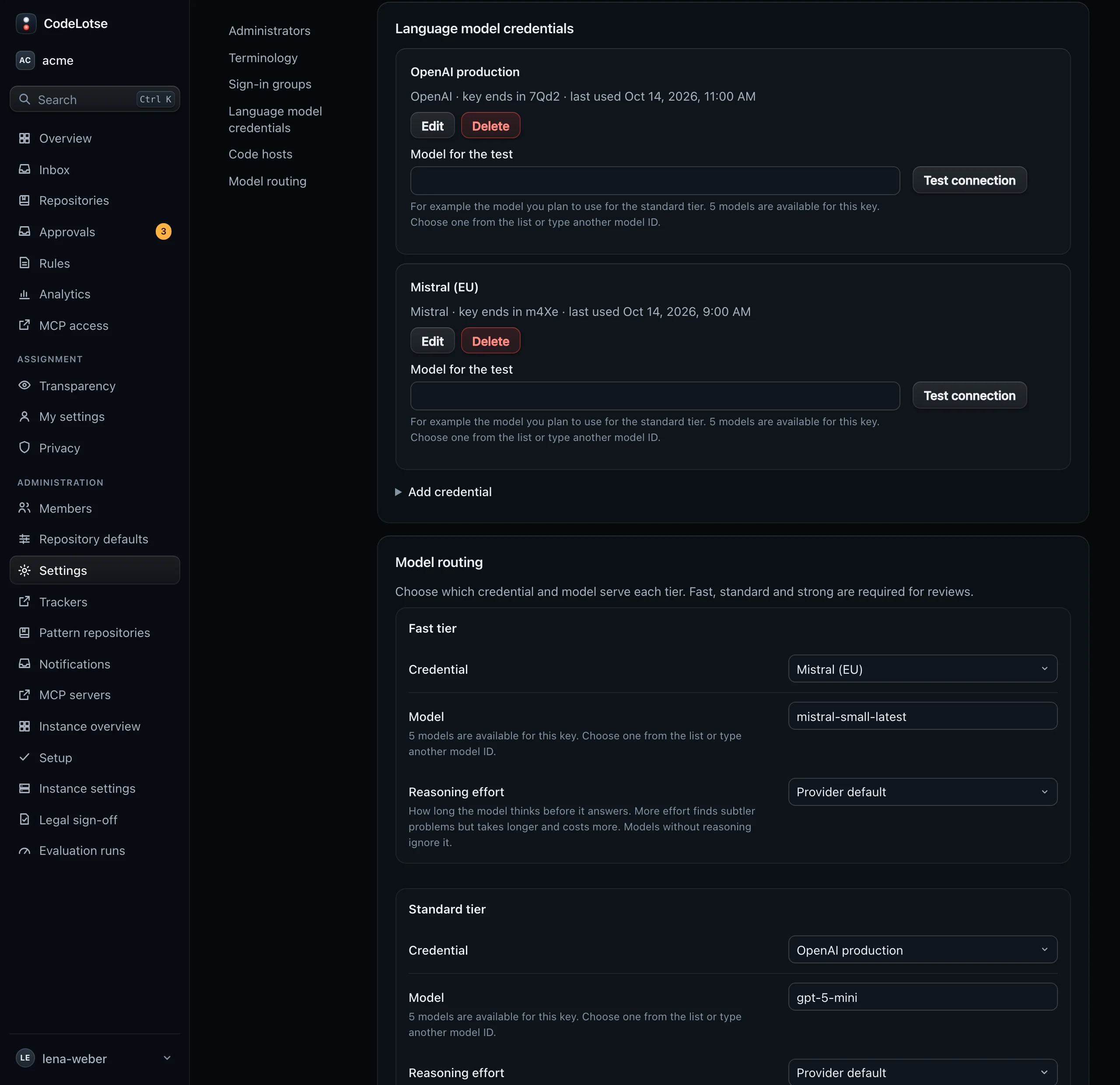
- Open Settings › Language model credentials and select Add credential.
- Choose the Provider: OpenAI, Anthropic, Azure OpenAI, Amazon Bedrock, Mistral or OpenAI-compatible.
- Enter a Name, for example "OpenAI production", and the API key.
- Fill in the fields the provider needs:
- OpenAI, Anthropic and Mistral use their official endpoint; there is nothing more to enter.
- Azure OpenAI: the Azure resource name or endpoint, for example
acme-openai. - Amazon Bedrock: the Region; EU regions are listed first.
- OpenAI-compatible: choose a Service, such as an EU-hosted service or a server of your own like Ollama or vLLM, or Custom URL, and check the Base URL.
- Save.
Each key then shows its provider, "key ends in" with the last four characters, and when it was last used. The key itself is stored encrypted and never shown again. Edit changes the name or endpoint; leave API key empty to keep the current key. Delete removes it.
Test a key ​
Under the key, enter a Model for the test, for example the model you plan to use for the standard tier, and select Test connection. CodeLotse sends one short request and reports "Connection works" with the model and the response time, or the provider's error.
The model field offers the models the provider lists for this key. You can also type any other model ID; for Azure OpenAI, type the name of your deployment.
Route tiers to models ​
CodeLotse splits its work into tiers, so you can use a strong model where it matters and a cheaper one elsewhere:
| Tier | Used for | Required |
|---|---|---|
| Fast tier | Quick classifications, for example in triage and when reading replies | Yes |
| Standard tier | Summaries, replies, answers, descriptions, CI analyses, acceptance checks and the plan of a fix run | Yes |
| Strong tier | Finding and verifying review findings, the code changes of a fix run | Yes |
| Embeddings (optional) | Comparing findings with earlier comments, semantic search in the code index | No |
Under Model routing, choose a Credential and a Model for each tier. For the fast, standard and strong tiers you can also set the Reasoning effort, from Provider default and None up to Maximum. More effort finds subtler problems but takes longer and costs more; models without reasoning ignore it. Save.
Reviews need all three of fast, standard and strong. Without an embeddings model, the code index stays lexical.
Set a budget ​
Below the tiers, tick Limit spending and enter:
| Field | Default | Meaning |
|---|---|---|
| Period in days | 30 | The length of one budget period. |
| Limit in EUR | 100 | The most the organisation may spend on model calls in one period. |
| When the limit is reached | Use a cheaper tier | Use a cheaper tier moves work to a cheaper tier; Stop model calls stops them until the next period. |
Spending is computed from the token prices of the models. Budget alerts at 50, 80 and 100 % by default appear on the overview and analytics pages and can be sent to notification channels. The thresholds are set in Analytics › Settings.
Override routing for a repository ​
On a repository's Policy tab, Model routing for this repository lets an organisation administrator choose another credential and model for single tiers, and a budget for that repository. Tiers set to Use the organisation setting follow the organisation routing.
See what models cost ​
- Every review run lists the models it called, with tier, calls, tokens and cost.
- The overview shows the spend of the last 14 days and the models with the highest spend.
- Analytics › Costs splits tokens and cost by feature, model and tier (Analytics).
Data sent to the provider ​
CodeLotse sends model calls only to the endpoints of the keys you added. They contain the diff, context from the repository, and pull request or issue text. Choose an EU-hosted provider or a server of your own if the code must stay in the EU or on your network (Air-gapped networks).