
Repositories and policy ​
Every repository in CodeLotse has a policy: the review mode, what is reported, how results are posted, and the mode and settings of every other feature. Administrators set the policy once for the whole organisation as Repository defaults; a repository follows them unless a section is customised. This page covers adding repositories, the policy and its sections, defaults, pattern repositories and the code index.
Add repositories ​
| Code host | How repositories arrive |
|---|---|
| GitHub, GitHub Enterprise Server | Install the GitHub App on the organisation, with all or selected repositories. Repositories you add to or remove from the installation on GitHub appear or disappear in CodeLotse. |
| GitLab, Azure DevOps, Bitbucket, Gitea, Forgejo | Add a code host connection with a scope, then Sync now. Repositories that leave the scope are removed. |
New repositories follow the repository defaults at once.
Find a repository ​
Repositories lists every repository you can see with its Mode, Your role (when roles differ), Pending approvals and Last review. Search by name, filter by Mode and sort by Needs attention first, Name or Last review.
Open a repository to see its tabs. The header shows the mode, the visibility (public, private or internal) and your role.
Change the policy of a repository ​
Open the repository's Policy tab. Maintainers and administrators can change it; everyone else sees it read-only. The section list on the left jumps to each part. Select Save at the end; leaving the page with unsaved changes asks for confirmation.
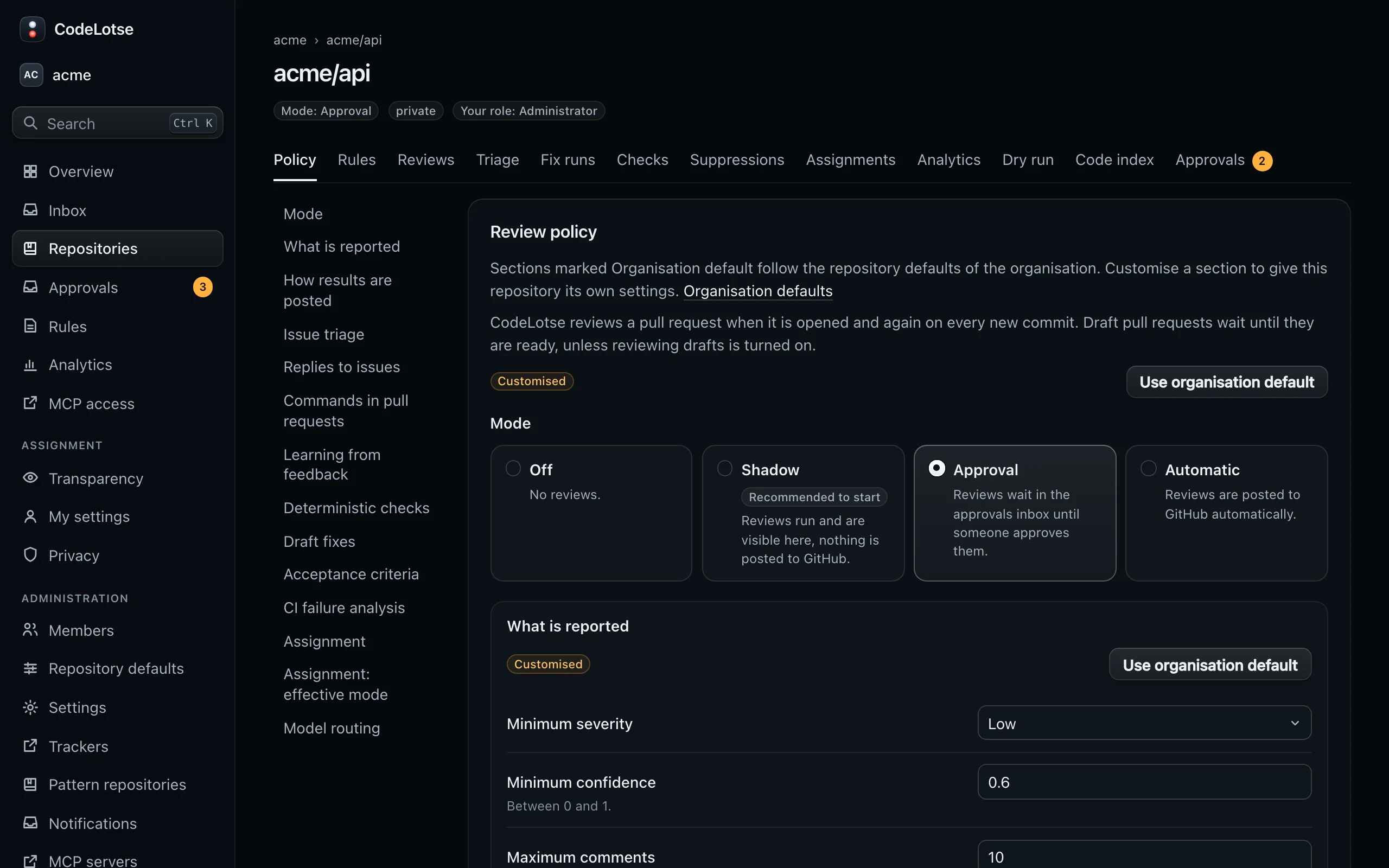
Follow or customise the defaults ​
Each section is marked Organisation default or Customised:
- Customise gives the repository its own values for that section.
- Use organisation default switches it back.
Model routing per repository is separate and never follows the defaults.
Review mode ​
| Mode | Effect |
|---|---|
| Off | No reviews. |
| Shadow | Reviews run and are visible in CodeLotse; nothing is posted. Recommended to start. |
| Approval | Reviews wait in Approvals until someone approves them. |
| Automatic | Reviews are posted to the code host at once. |
What is reported ​
| Setting | Default | Meaning |
|---|---|---|
| Minimum severity | Low | Findings below it are kept in the web app only. |
| Minimum confidence | 0.6 | Between 0 and 1. Findings below it are kept in the web app only. |
| Maximum comments | 10 | Per review, 0 to 50. |
| Maximum input tokens | 60,000 | 4,000 to 400,000 per review. Larger changes are reviewed in part; skipped files are listed. |
| Maximum analysis passes | 3 | 1 to 10 finder passes per review. |
| Ignored paths | none | One glob pattern per line, for example dist/**. Added to ignorePaths in .quavon/config.yml. |
How results are posted ​
| Setting | Default | Meaning |
|---|---|---|
| Summary comment | Collapsed | Shown, Collapsed or Off. |
| Include code suggestions | On | Adds suggested changes to comments (Suggested changes). |
| Stay quiet when nothing is found | On | Posts no comment when there is nothing to report. |
| Report a check run | On | The CodeLotse status on the head commit. |
| Fail the check on critical findings | Off | Turn on and make the check required in branch protection to block merging on critical findings. |
| Review only new commits | On | Incremental reviews of new commits. |
| Review draft pull requests | Off | Otherwise drafts wait until they are ready. |
| Comment on the pull request when the first review starts | Off | A short notice that a review is coming. |
| Add a flow diagram to the summary | Off | Where the code host renders diagrams. |
| Add a prompt for coding agents to each comment | On | A collapsed prompt per comment and one for all findings. |
| Review label | "Automated review by CodeLotse" | The footer line under every review comment. |
Feature sections ​
| Section | Modes | Page |
|---|---|---|
| Issue triage | Off, Shadow, Approval, Automatic | Issue triage and replies |
| Replies to issues | Off, Shadow, Approval, Automatic (approval on public repositories) | Issue triage and replies |
| Commands in pull requests | Off, Shadow, Approval, Automatic; Allowed commands | Commands in comments |
| Pull request description | Off, Shadow, Approval, Automatic | Pull request descriptions |
| Learning from feedback | Off, Shadow, On | Rules, suppressions and learnings |
| Deterministic checks | Off, Shadow, On | Checks |
| Draft fixes | Off, Shadow, Approval, Automatic | Draft fixes |
| Acceptance criteria | Off, Shadow, On | Checks |
| CI failure analysis | Off, Shadow, Approval, Automatic | CI failure analysis |
| Assignment | Off, Shadow, Suggest, Apply | Assignment and privacy |
| Code index | Off, Lexical, Hybrid | Code index |
| External context (MCP) | Off, On | MCP context for reviews |
Each section shows when it runs and the settings of the chosen mode. A section that is not available, for example draft fixes without the fixer app or external context before its security sign-off, shows why and stays off.
Draft fixes ​
Draft fixes turns on Issue to pull request for the repository. Besides the mode:
| Setting | Default | Meaning |
|---|---|---|
| Trigger labels | quavon:fix | Adding one of them to an issue starts a fix. |
| Allow the fix command in issue comments | On | @codelotse fix on an issue. |
| Maximum changed files, Maximum changed lines | 10, 300 | Larger patches are rejected. |
| Allowed paths, Denied paths | none | Glob patterns, in addition to the built-in protected paths. |
| Allow changes to lockfiles | Off | |
| Setup command, Test command, Lint command | none | Run in the sandbox, for example npm ci, npm test, npm run lint. |
| Sandbox image | Node.js | Node.js, Python or Go. |
| Network access in the sandbox | None | Or Package registries only, from the instance allowlist. |
| Fix runs per day, Fix runs per issue and day | 5, 2 | Limits per repository. |
| Fixes for review findings | Off | Fixes from a review run; awaiting security sign-off. |
The status line Fixer app installed or Fixer app not installed or permissions missing tells you whether fixes can run. Automatic is turned down to approval on public repositories. Draft fix branches run your CI, including its repository secrets.
Assignment: effective mode ​
Below the policy, Assignment: effective mode shows the Requested mode, the Effective mode and why the effective mode is lower, for example "No legal sign-off is recorded for this instance". Administrators also find Apply opt-in here. See Assignment and privacy.
Model routing for this repository ​
Model routing for this repository overrides single tiers of the organisation routing, for example a stronger model for a critical repository, and can set a budget for the repository. Organisation administrators edit it here; other people see the overrides as a list, or Use the organisation setting when there are none. See Models and keys.
Set repository defaults ​
Administration › Repository defaults holds the same sections as a repository policy, without model routing. Every repository follows them in each section that has not been customised, including repositories added later. The page shows how many repositories follow the defaults and how many have their own settings in at least one section.
Saving updates every repository that follows the defaults. Customised sections stay as they are, unless you tick Also reset customised repositories to these defaults. The setup wizard sets the default mode to the mode most repositories got there.
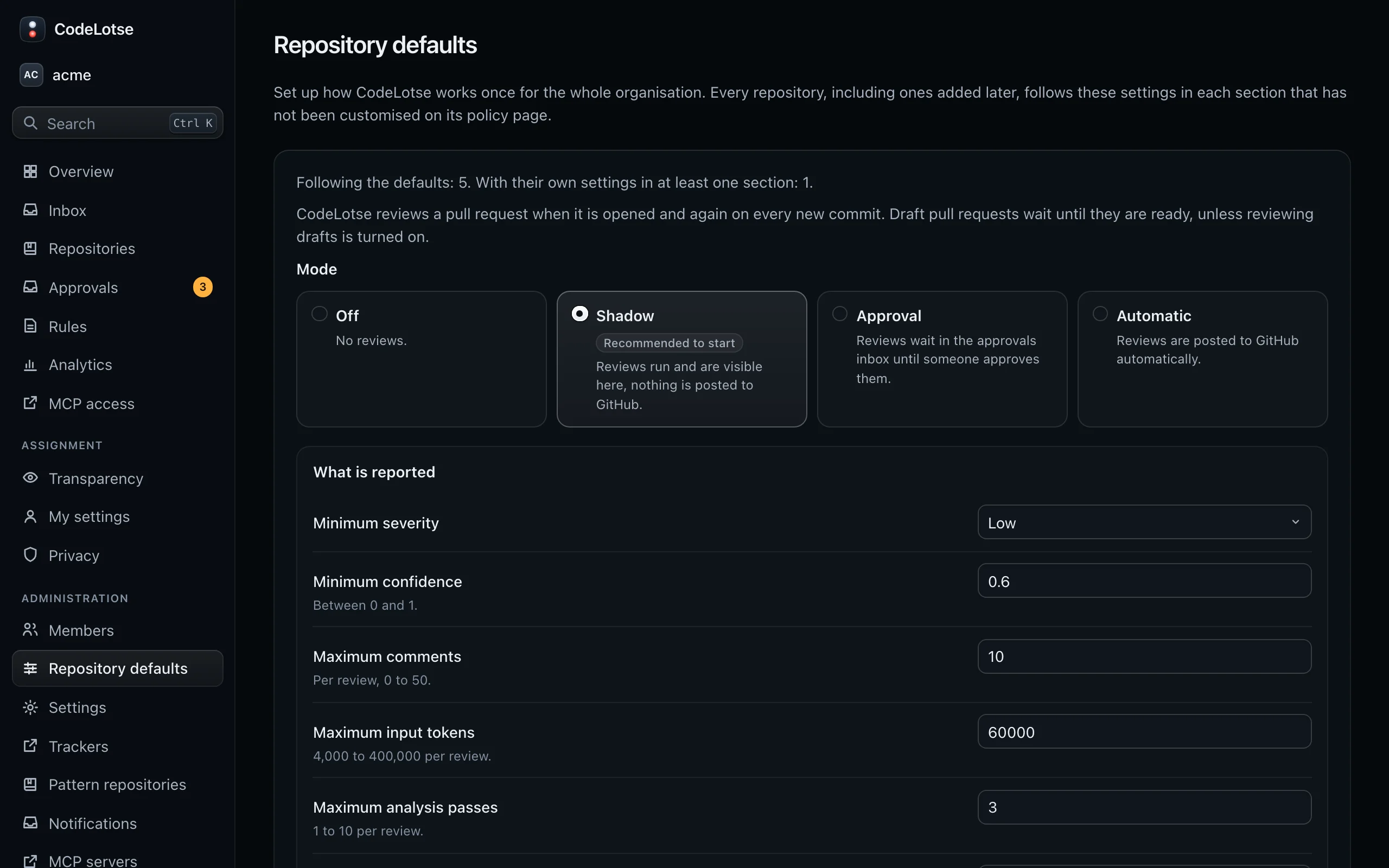
.quavon/config.yml in a repository is combined with these settings and cannot turn on what an administrator turned off (Repository configuration).
Pattern repositories ​
Administration › Pattern repositories lists up to three repositories whose code every review in the organisation may compare against, for example a reference implementation or a shared library. Choose a Repository and select Add; the remove action next to each entry takes it out again.
A pattern repository needs a ready code index. Visibility is respected: a public repository uses only public pattern repositories, an internal one no private ones.
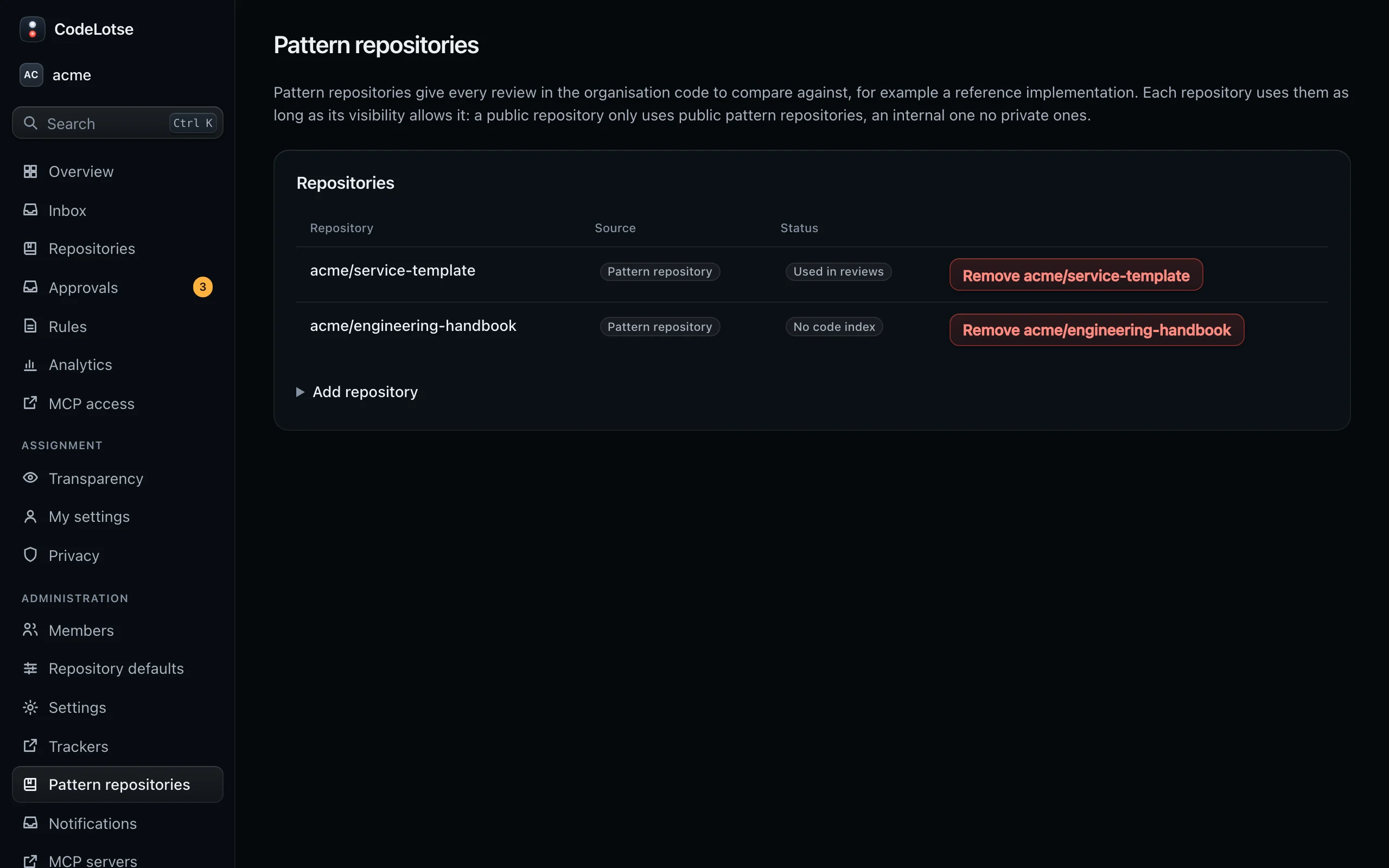
Code index ​
The code index keeps a searchable copy of a repository's default branch, so reviews can find similar code and every place that uses a changed definition. Turn it on in the policy section Code index:
| Mode | Effect |
|---|---|
| Off | Default. No index; switching off deletes the stored index. |
| Lexical | Full-text search over the code. |
| Hybrid | Adds semantic search. Needs an embeddings model in model routing and pgvector on the database. |
The Code index tab shows the state (Waiting for the first build, Building, Ready, Failed or Storage limit reached), the Indexed commit, Files, Chunks, Size, Embeddings, whether Semantic search is available and the Storage of the organisation. Maintainers can Rebuild it. The index is updated after each push to the default branch.
The same tab has Linked repositories: other repositories whose code reviews may use, from administrators, from context.linkedRepositories in .quavon/config.yml and from pattern repositories, each with its status, such as Used in reviews or No code index. Administrators link another repository by choosing it and selecting Add. See Linked repositories.
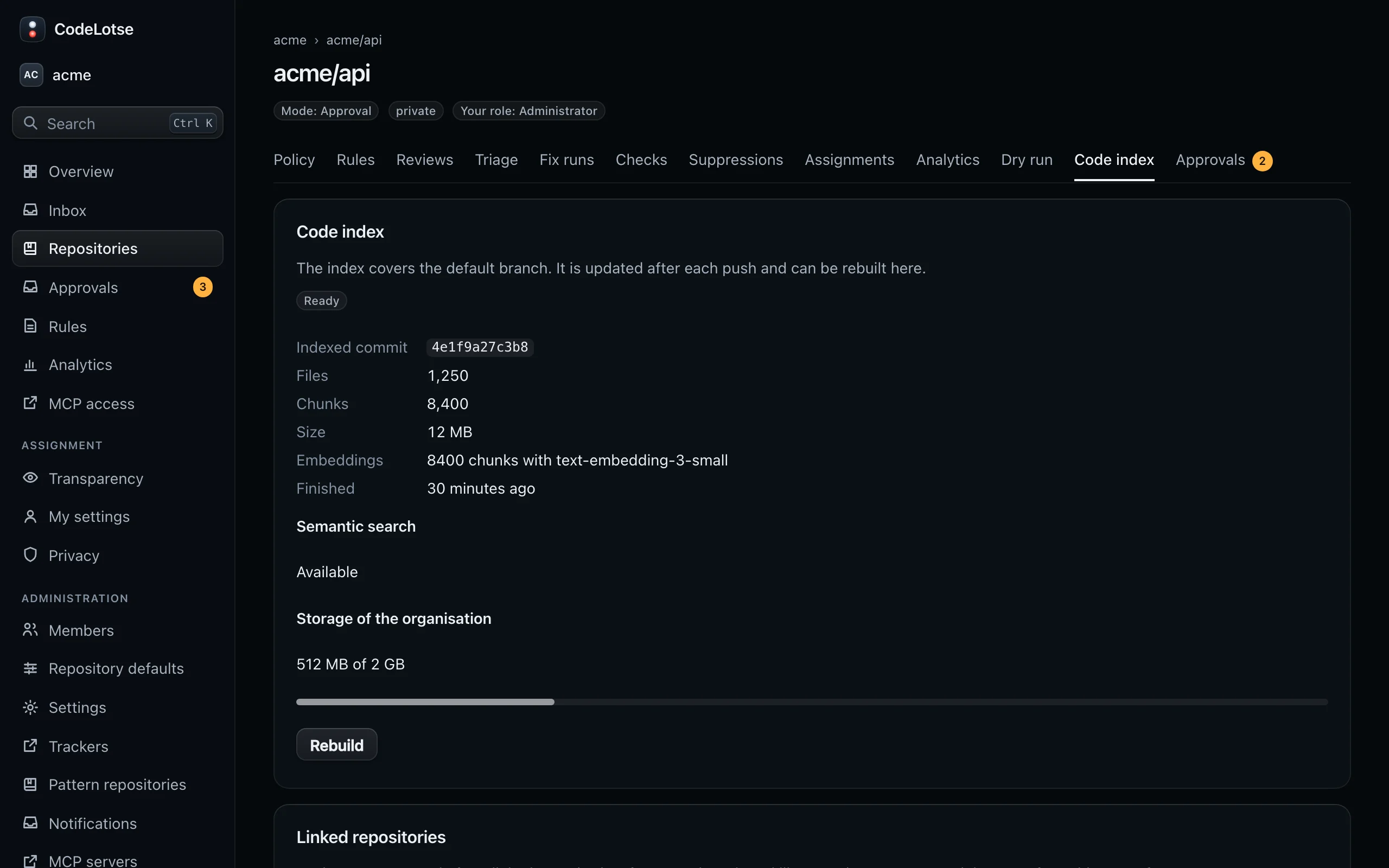
The index stores source code in the CodeLotse database. Sizing and limits for operators are in Code index.