
Members and roles ​
CodeLotse does not manage its own user accounts or passwords. People sign in with GitHub or with a company account, and their roles come from the code host or from sign-in groups. This page explains the roles, what each may do and where they come from.
Roles ​
Every person has one role in the organisation and, per repository, at most one repository role.
| Role | Kind | In short |
|---|---|---|
| Administrator | Organisation | Manages the organisation and has every repository permission on every repository. |
| Member | Organisation | Uses CodeLotse for the repositories they have a role on. |
| Maintainer | Repository | Changes the repository's policy and rules and decides on proposals. |
| Reviewer | Repository | Approves or rejects what CodeLotse wants to post. |
| Reader | Repository | Sees reviews and results of the repository. |
Separate from these, an instance administrator manages the self-hosted instance itself (Instance administration). Being instance administrator does not make you an administrator of an organisation.
Where roles come from ​
| Signed in with | Organisation role | Repository role |
|---|---|---|
| GitHub | Administrator for owners of the GitHub organisation and members of the admin team; Member for other members of the organisation. For an app installed on a personal account, that account is Administrator. | From the GitHub permission on the repository: admin or maintain → Maintainer, write → Reviewer, read → Reader. Only for members of the organisation, so read access to a public repository grants nothing. |
| A company account (OpenID Connect) | From the sign-in groups of the organisation | From the sign-in groups |
Roles from GitHub are read at sign-in and refreshed while you use CodeLotse, so a change on GitHub reaches CodeLotse within ten minutes. Roles from sign-in groups are re-checked with every request; group changes at the identity provider apply at the next sign-in.
Organisation administrators see every repository, including repositories of code host connections. Other people see the repositories they have a role on.
What each role may do ​
| Action | Reader | Reviewer | Maintainer | Administrator |
|---|---|---|---|---|
| See Overview, Inbox and Repositories | yes | yes | yes | yes |
| See a repository's policy, rules, reviews, triage, fix runs, checks, suppressions, assignments, analytics, dry runs and code index | yes | yes | yes | yes |
| Create and revoke their own MCP access tokens | yes | yes | yes | yes |
| Use Transparency, My settings and push notifications | yes | yes | yes | yes |
| Approve or reject outputs on the repository's Approvals tab | yes | yes | yes | |
| Change the repository's policy | yes | yes | ||
| Add, edit and delete repository rules; activate or reject learnings and suppressions | yes | yes | ||
| Run a failed review again, request fixes for review findings | yes | yes | ||
| Start and cancel dry runs, rebuild the code index, see the repository's model costs | yes | yes | ||
| Use the organisation-wide Approvals inbox | yes | |||
| Override model routing for a repository in the web app | yes | |||
| Manage organisation Rules, Repository defaults, Settings, Trackers, Pattern repositories, Notifications and MCP servers | yes | |||
| Link repositories, turn MCP access on or off, revoke anyone's MCP token | yes | |||
| Answer Assignment › Privacy, opt a repository in to apply | yes | |||
| See Members and organisation Analytics; export the audit log through the API | yes |
Commands in pull request comments, such as @codelotse re-review or @codelotse fix, are checked against the permission on the code host when the command runs: write or admin access is needed (Commands in comments).
The permission each API route requires is listed in the HTTP API reference.
See who has signed in ​
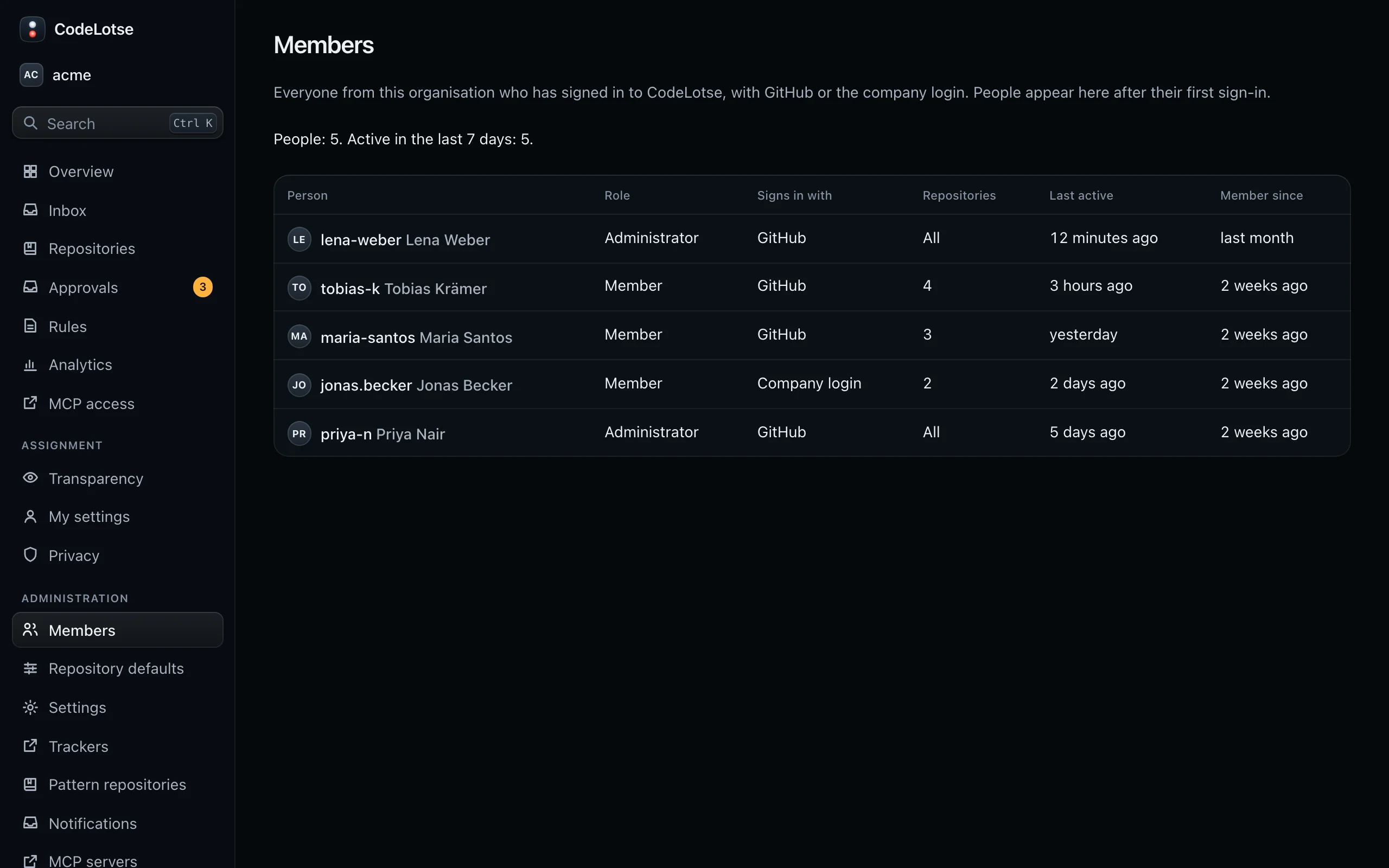
Administration › Members lists everyone from the organisation who has signed in, with GitHub or a company account. People appear after their first sign-in. The summary shows how many people there are and how many were active in the last seven days.
| Column | Content |
|---|---|
| Person | Name and login |
| Role | Administrator or Member |
| Signs in with | GitHub or Company login |
| Repositories | All, or the number of repositories with a role |
| Last active, Member since | When the person last used CodeLotse and first signed in |
The list is read-only. To change a role, change it on GitHub, in the admin team or in the sign-in groups.
Remove someone ​
Remove the person from the GitHub organisation or repository, or from the group at your identity provider. CodeLotse refreshes their access within ten minutes; sessions from an identity provider end at the latest after eight hours. Their personal MCP tokens stop working when they lose access. To delete the personal data stored about someone, an operator uses data subject requests.