
Approvals ​
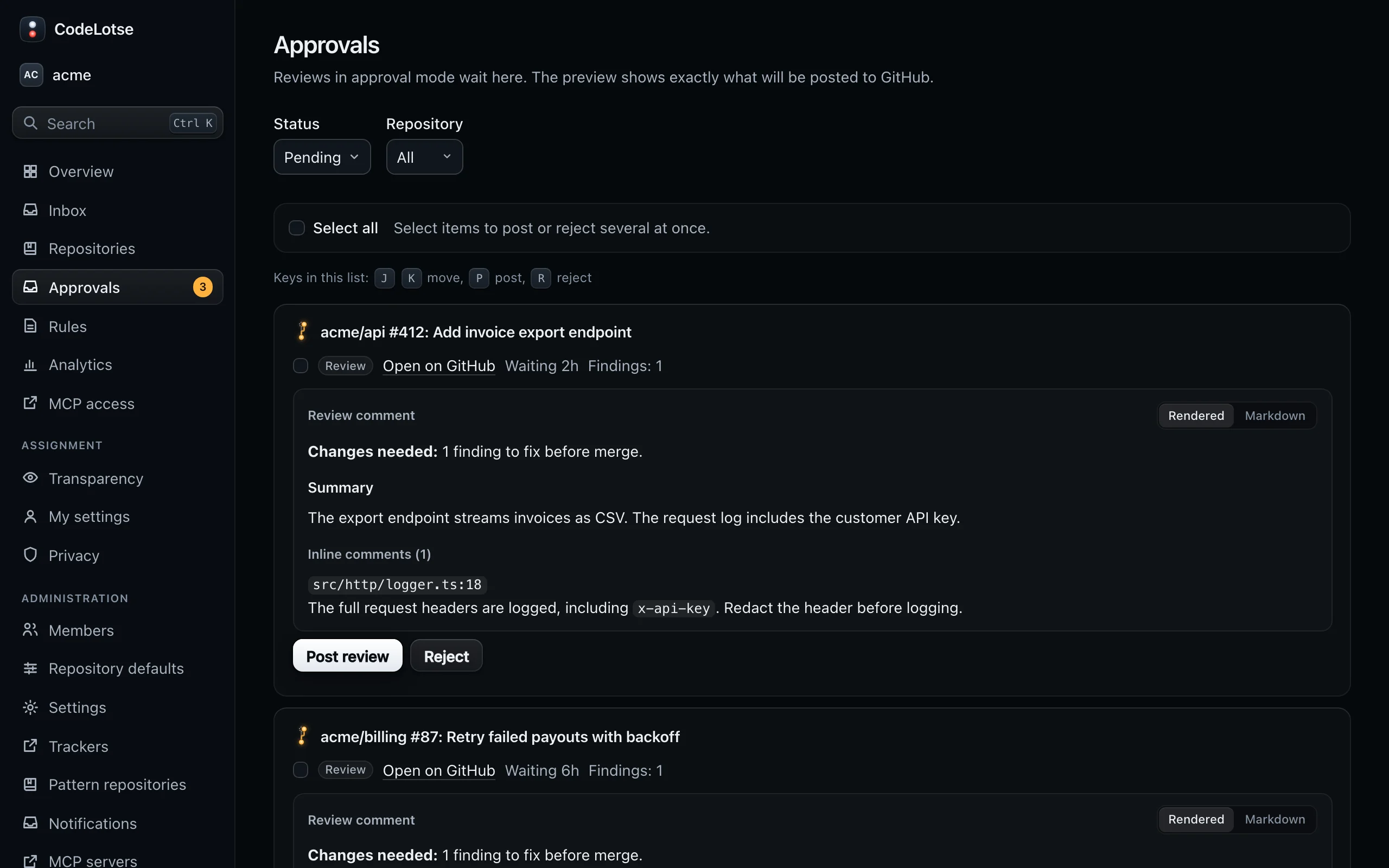
In Approval mode, CodeLotse prepares its output but posts nothing until a person approves it. Approvals collect reviews, triage labels, replies, answers, pull request descriptions, CI failure analyses and draft fixes in one place, each with a preview of exactly what will be posted.
Who can approve ​
| Where | Who |
|---|---|
| Approvals in the sidebar, for every repository of the organisation | Organisation administrators |
| The Approvals tab of a repository | Maintainers, reviewers and administrators of that repository |
Every decision is recorded with the person and time ("decided by … on …") and written to the audit log.
Review what is waiting ​
The list shows pending items first. Filter by Status (Pending, Approved, Rejected, Expired, Published or All) and, in the organisation-wide view, by Repository. Each item names the feature, the repository and the pull request or issue, how long it has been Waiting and when it expires.
Items for the same pull request or issue are grouped together. Each item shows its preview:
| Feature | Preview | Post action | Reject action |
|---|---|---|---|
| Review | Review comment and Inline comments, each on its file and line | Post review | Reject review |
| Triage | Labels to add, or a comment that asks for missing information or names possible duplicates | Apply labels or Post reply | Reject labels or Reject reply |
| Reply | The reply comment | Post reply | Reject reply |
| Chat | The answer to a command or question | Post answer | Reject answer |
| CI analysis | The CI failure analysis comment | Post reply | Reject reply |
| Pull request description | The description block and suggested title | Update description | Reject description |
| Draft fix | Pull request, Branch, Changed files and the Diff | Open pull request | Reject draft fix |
| Fix for review findings | The stacked pull request, or the commit to the pull request branch, with its diff | Open pull request or Push commit | Reject draft fix or Reject commit |
Switch the Preview format between Rendered and Markdown to see the raw text that will be posted.
Post or reject ​
- Select the post action to publish the item. It goes through the outbox and is posted once.
- Select Reject and optionally enter a Reason. Nothing is posted. A rejected review counts as feedback for learning.
- Keyboard: in the list, J and K move, P posts, R rejects.
- Bulk: tick several items (or Select all) and use Approve selected or Reject selected. CodeLotse asks for confirmation and reports how many succeeded and failed.
A review that is approved after the pull request got a newer commit is not posted, because it no longer matches the code. The next review covers the new commit.
Check draft fixes carefully ​
Draft fixes and fix commits change code. Their preview marks files that are Runs in CI: files executed during CI or builds, such as workflow files or build scripts. Approving lets them run with access to your CI secrets. Read those files line by line before you approve.
Approving a draft fix opens a draft pull request from a new branch; approving a fix commit pushes one commit to the pull request branch. See Issue to pull request.
Expiry ​
An item that nobody decides on expires after seven days. Expired items stay visible but can no longer be approved or rejected. For a review, push a new commit or ask for re-review to get a fresh one.
Get notified ​
Administrators can be notified when outputs are waiting, at most once an hour: through a notification channel or as a push notification on their device (Phone and push notifications).