
MCP server ​
CodeLotse is an MCP server. A coding agent such as Claude Code, Cursor or VS Code can connect to it over the Model Context Protocol and read reviews, findings, rules and indexed code while you work on a pull request. The agent can only read. It sees what you see in the CodeLotse web interface for one organisation, never more.
Turn it on ​
An organisation admin opens MCP access in the organisation navigation and selects Allow MCP access for this organisation. The setting is off by default. While it is off, no access token works and nobody can create one.
Create an access token ​
- Open MCP access and select Create token.
- Enter a name, for example the computer or tool that uses the token, and choose when it expires (7 to 90 days, default 30).
- Copy the token. It is shown only once and starts with
clt_. Store it in your agent configuration or a password manager, never in a repository.
You can have at most 10 active tokens per organisation. The list shows each token's name, last four characters, owner, creation and expiry date and when it was last used. You can revoke your own tokens; organisation admins can revoke every token of the organisation.
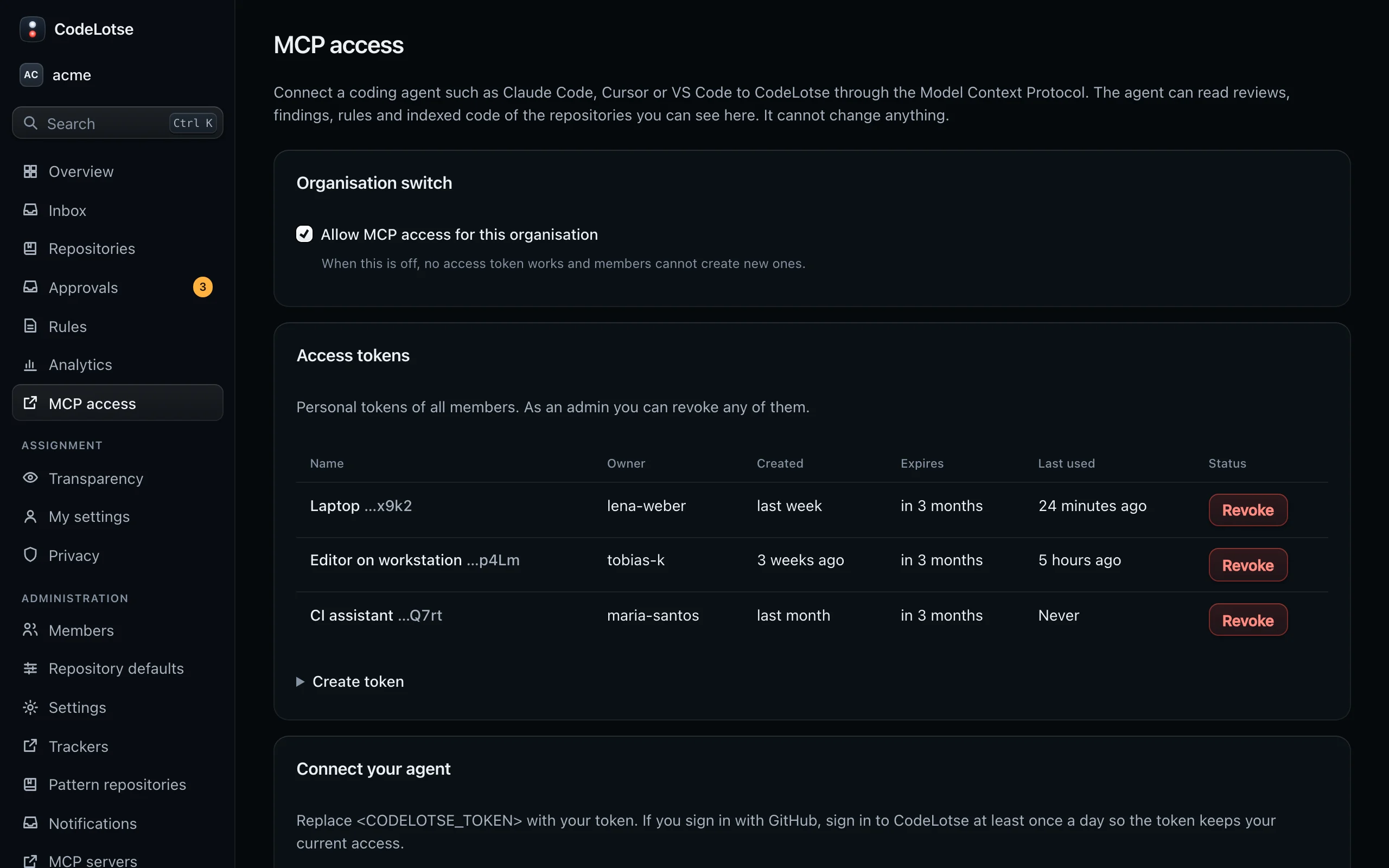
A token stops working when it expires or is revoked, when an admin turns MCP access off, when your account is deleted, or when you lose access to the organisation. Sign-in specifics:
- GitHub sign-in: a token uses the organisation and repository access recorded at your last sign-in to CodeLotse. If that is older than 24 hours, the server answers
401with "sign in to CodeLotse to refresh access". Sign in to the web interface once and the token works again. - OIDC sign-in: a token uses the groups of your last sign-in through the same identity provider. Removed group mappings and a disabled identity provider apply at once.
Connect your agent ​
The Connect your agent section of the page shows ready-made snippets with the address of your instance. Replace <CODELOTSE_TOKEN> with your token.
Claude Code:
claude mcp add --transport http codelotse https://codelotse.example.com/mcp --header "Authorization: Bearer <CODELOTSE_TOKEN>"Cursor (~/.cursor/mcp.json):
{
  "mcpServers": {
    "codelotse": {
      "url": "https://codelotse.example.com/mcp",
      "headers": { "Authorization": "Bearer <CODELOTSE_TOKEN>" }
    }
  }
}
VS Code (.vscode/mcp.json):
{
  "servers": {
    "codelotse": {
      "type": "http",
      "url": "https://codelotse.example.com/mcp",
      "headers": { "Authorization": "Bearer <CODELOTSE_TOKEN>" }
    }
  }
}
The token must be sent in the Authorization header. The server does not read tokens from the address, from cookies or from other headers. Clients that only support OAuth cannot connect yet.
Tools ​
| Tool | Arguments | Returns |
|---|---|---|
list_repositories | none | The repositories you can see, with review mode and last review time |
get_pull_request_review | repository, number, optional status | The latest review of the pull request with its summary and up to 100 findings |
search_findings | repository, optional query (title or path, up to 100 characters), severity, category, status, limit (1–50, default 20) | Findings of the last 90 days, newest first |
get_rules | repository, optional path | Rules and learnings for the repository, or only those that apply to the path |
get_fix_prompt | repository and either findingIds (1–20, from one review) or reviewRunId | A prompt for your agent that lists the findings to fix |
search_code | repository, query, limit (1–20, default 10) | Matching code from the repository's code index (keyword search) |
repository is a repository id or its full name, for example acme/web. A repository you cannot see and one that does not exist both answer "Not found.".
Every result is marked as untrusted data: findings and code come from pull requests and repositories that other people control. Secrets that look like known token formats are replaced by [REDACTED]. Your agent should check each finding against the current code before it changes anything; the fix prompt says so too.
Protocol ​
POST /mcp serves the MCP revision 2026-07-28 (server/discover) and older clients that start with initialize (2025-11-25 and earlier). The endpoint keeps no session state; GET and DELETE answer 405. Each token may send 120 requests a minute. Results are limited to 32 KiB.
Self-hosted instances route /mcp to the API through Caddy without buffering responses. Behind your own reverse proxy, forward /mcp to the API like /api/* and keep the Authorization header.