
Quickstart (self-hosted) ​
This is the shortest path from an empty server to the first CodeLotse review on GitHub. It takes about half an hour. Each step links to the full guide; if you would rather not run CodeLotse yourself, use the EU cloud instead.
Before you start ​
You need:
- a Linux server with Docker Engine 24 or newer and the Docker Compose v2 plugin, at least 2 CPUs, 4 GiB of memory and 20 GiB of free disk;
- a public host name that resolves to the server, with ports 80 and 443 reachable from the internet, so that certificates can be issued and GitHub can deliver webhooks;
- owner rights on a GitHub organisation (or a personal account) where you can create and install a GitHub App;
- an API key for a model provider: OpenAI, Anthropic, Azure OpenAI, Amazon Bedrock, Mistral or any OpenAI-compatible endpoint.
The complete list, including the tools the installer needs on the host, is in Requirements. For GitHub Enterprise Server see GitHub Enterprise Server; for Kubernetes see Kubernetes (Helm).
1. Install ​
git clone <repository-url> codelotse && cd codelotse
./deploy/compose/quavon install --domain codelotse.example.com --email ops@example.com
The installer checks the host, generates every secret, builds and starts the stack and waits until all services are healthy. On the first installation it ends with a one-time setup link:
https://codelotse.example.com/setup?token=…

Next steps:
  1. Open the setup link, create the GitHub App and sign in with GitHub.
  2. Run ./quavon doctor to verify the installation.
  3. Back up …/deploy/compose/secrets and …/deploy/compose/.env; without them the data cannot be decrypted.
The link is valid for one hour and works once. If it expired, create a new one with ./deploy/compose/quavon setup-token. Options such as your own certificates or the sandbox are described in Install with Docker Compose.
2. Create the GitHub App ​
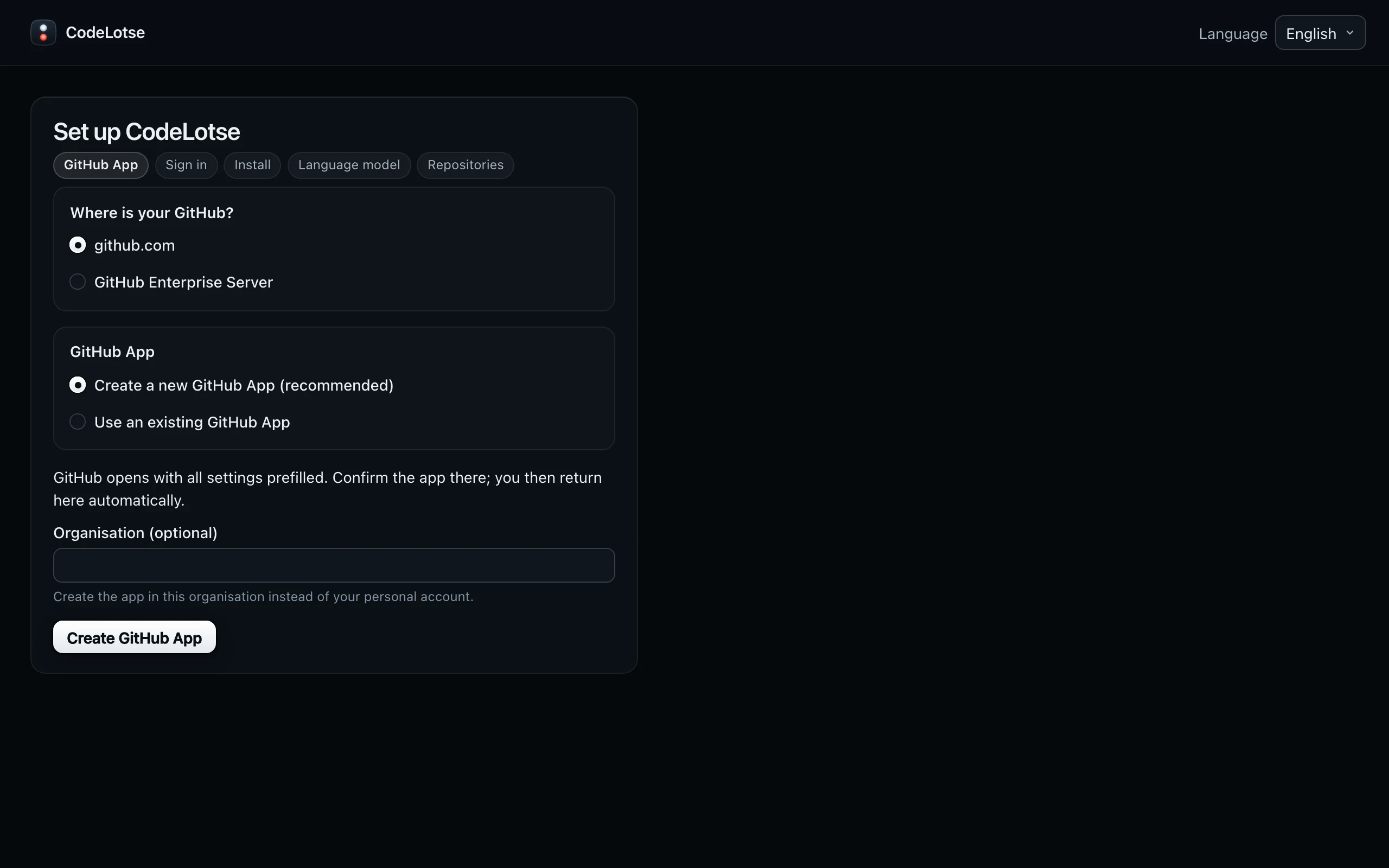
Open the setup link. The Set up CodeLotse page asks two questions:
- Where is your GitHub? Keep the github.com address, or choose GitHub Enterprise Server and enter its host name.
- GitHub App: choose Create a new GitHub App (recommended). Under Organisation (optional), enter your GitHub organisation to create the app there instead of in your personal account.
Select Create GitHub App. GitHub opens with every permission and webhook prefilled. Confirm the app there (rename it if CodeLotse is taken); GitHub sends you back to CodeLotse.
3. Sign in and install the app ​
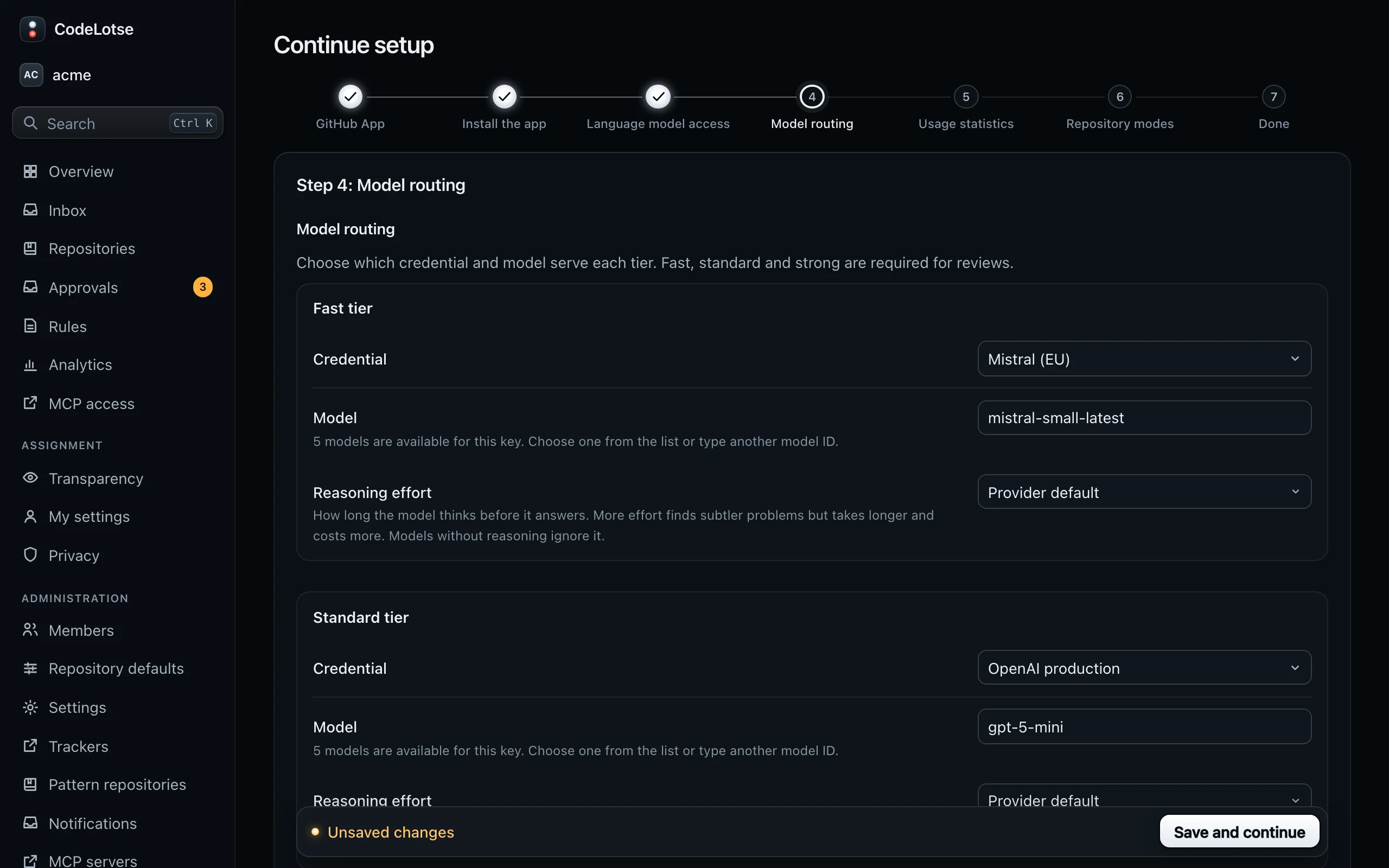
Select Sign in with GitHub. The first sign-in through the setup link makes you instance administrator. CodeLotse then opens Continue setup, which tracks the remaining steps:
| Step | What to do |
|---|---|
| GitHub App | Done already. |
| Install the app | Select Install on GitHub, choose the organisation and the repositories CodeLotse should review, then return and select Refresh status. If the page asks you to sign in again, do so: your administrator role in the organisation is read at sign-in. |
| Language model access | Select Add credential, choose the provider, enter a name and the API key, and use Test connection. See Models and keys. |
| Model routing | Choose a credential and a model for the Fast tier, Standard tier and Strong tier. Embeddings (optional) can stay empty. Select Save and continue. |
| Usage statistics | Optional and off by default. You can skip it (Telemetry). |
| Repository modes | Choose a mode per repository, or use Set all to. Keep Shadow (recommended) for a first trial. Select Finish setup. |
Then check the installation from the server:
./deploy/compose/quavon doctorEvery warning comes with a code and a fix; see quavon doctor.
4. Open a test pull request ​
Open a small pull request in one of the repositories, for example one that adds a function with an obvious bug. Within a minute or two:
- In Shadow mode nothing appears on GitHub. Open Inbox in CodeLotse, or the repository's Reviews tab, to see the review run, its findings and its cost.
- In Approval mode the review waits under Approvals. Select Post review to publish it.
- In Automatic mode GitHub shows a review from the app with a summary, inline comments and a status named CodeLotse on the head commit.
What each part of a review means is described in Pull request reviews.
5. Go further ​
- Try CodeLotse on your history first: a dry run reviews recently merged pull requests and compares the findings with your reviewers' comments, without posting anything.
- Set the organisation defaults once for all repositories: Repositories and policy.
- Let your colleagues sign in. Anyone with access to a repository on GitHub can sign in with GitHub; for company accounts add an identity provider.
- Turn on more features: issue triage, draft fixes (needs the sandbox), deterministic checks, notifications.
- Back up
deploy/compose/secrets/anddeploy/compose/.envtogether with the database (Backup and restore).
Something went wrong ​
| Symptom | Where to look |
|---|---|
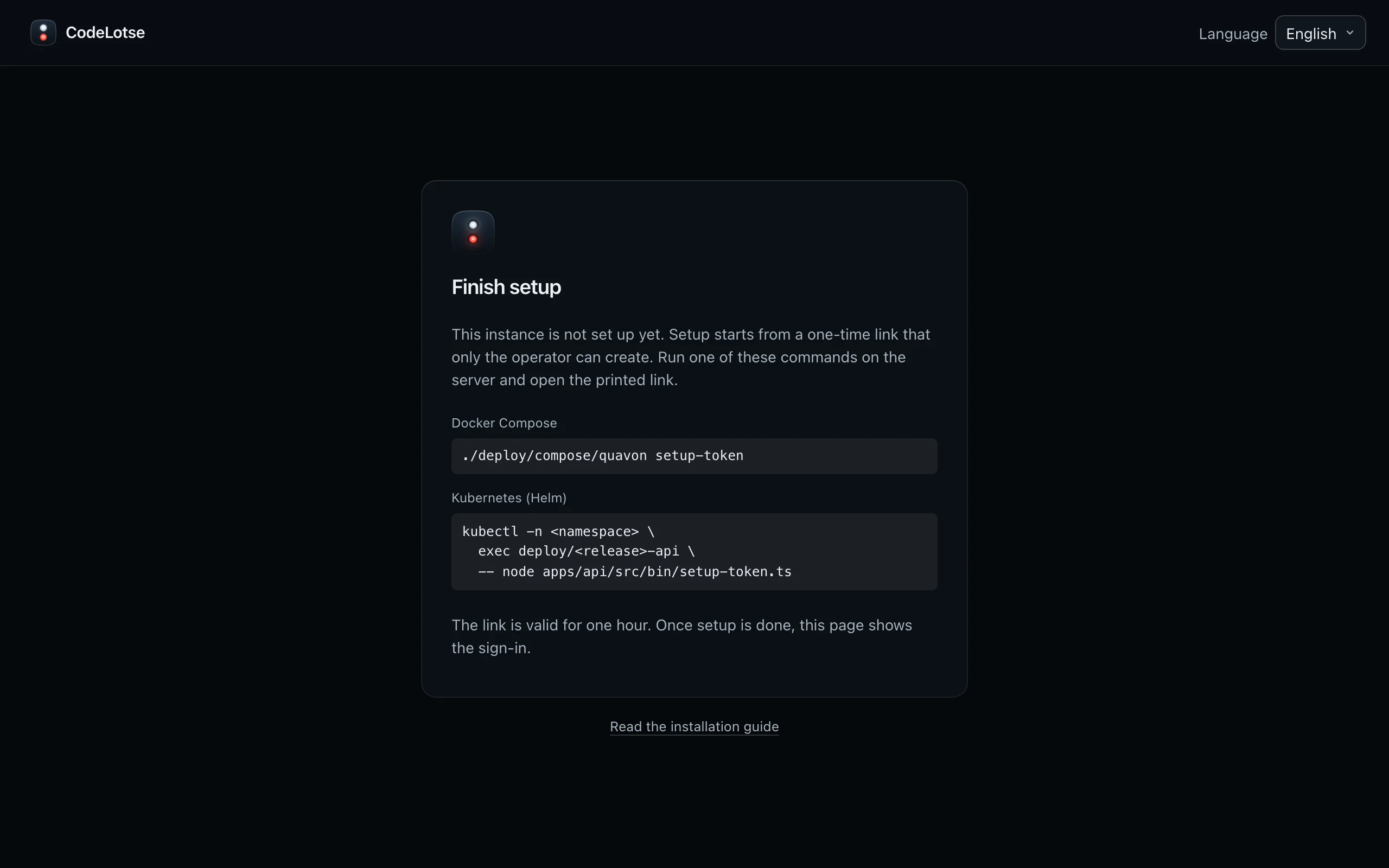
| The base address shows Finish setup | Setup has not been done yet; create a link with ./deploy/compose/quavon setup-token. |
| The setup link says it is invalid or expired | Create a new link. Each link works once and for one hour. |
| No review appears after opening a pull request | The repository's mode is Off, the pull request is a draft, or webhooks do not reach the server. Run quavon doctor and see Troubleshooting. |
| The review failed | Open the review run; the error is shown at the top. A wrong model name or an exhausted key are the usual causes. |
| Nobody can sign in as instance administrator any more | Use break-glass access. |