
Checks and acceptance criteria ​
Besides the AI review, CodeLotse can run two kinds of checks on a pull request: deterministic scanners that find known patterns, and a check of the acceptance criteria of the issue the pull request links. Both appear in the review and on the Checks tab of the repository, together with CI failure analyses.
Deterministic checks ​
Deterministic checks run proven scanners in the sandbox once per review, next to the AI review:
| Scanner | Finds |
|---|---|
ast-grep | Patterns from the CodeLotse rule pack |
gitleaks | Secrets such as keys and tokens in the change |
bandit | Security problems in Python |
gosec | Security problems in Go |
ruff | Problems in Python |
eslint-security | Security problems in JavaScript and TypeScript (ESLint with eslint-plugin-security) |
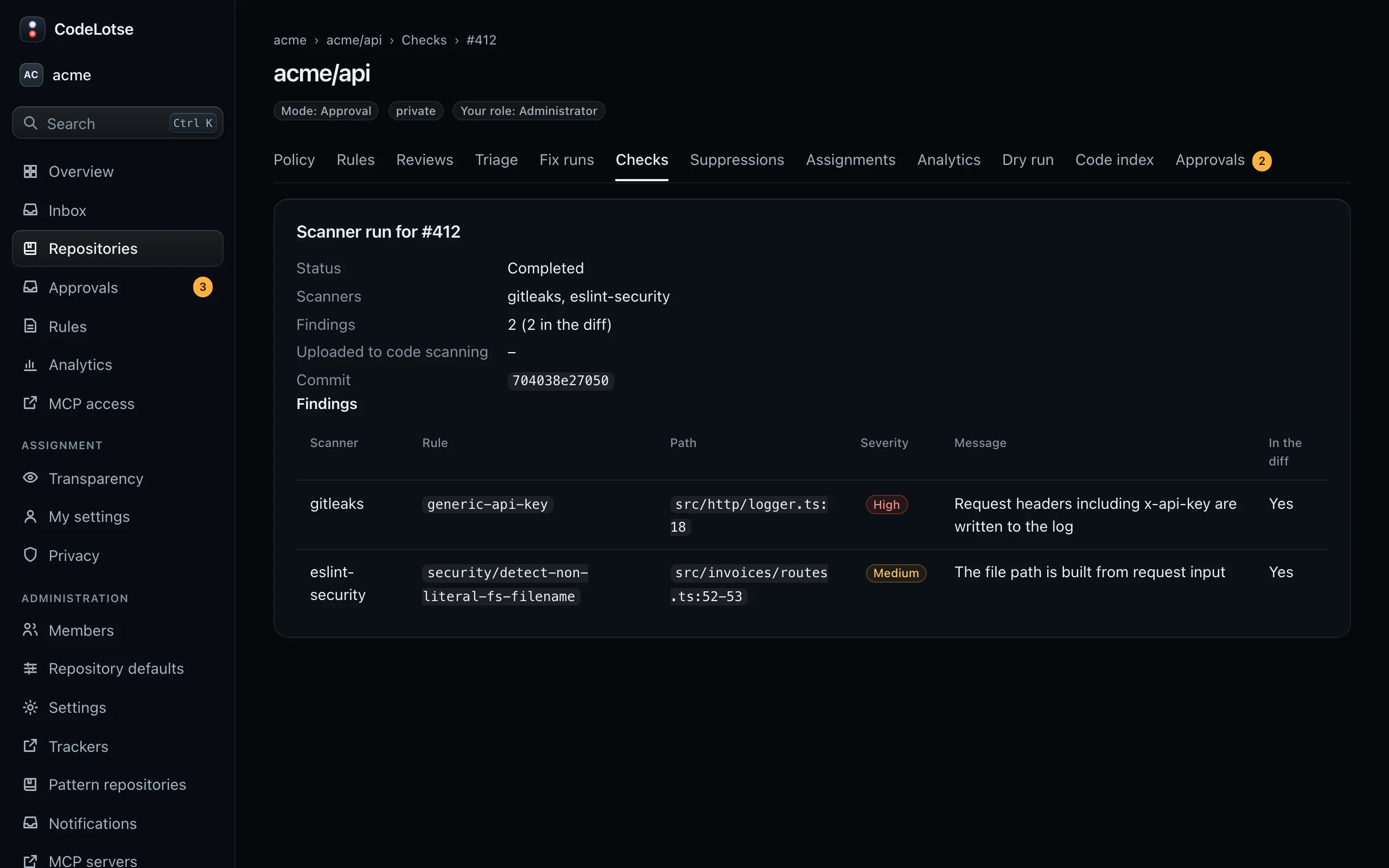
Findings on changed lines join the review with the badge "deterministic" and the tool name, and the summary gets its own section. They are not checked by a model, so they are reported the same way every time. On GitHub the results can also be uploaded to code scanning as SARIF.
Turn them on ​
An administrator or maintainer sets Deterministic checks in the repository policy:
| Setting | Default | Meaning |
|---|---|---|
| Deterministic checks mode | Off | Shadow stores the findings on the Checks tab only. On adds them to the review. |
| Scanners | All six | Which scanners run. |
| Own scanners | None | Scanners the instance administrator added to the sandbox. |
| Minimum scanner severity | Low | Findings below it are dropped. |
| Context lines around a finding | 3 | Lines of code kept around each finding. |
| Maximum findings per run | 50 | Further findings are cut off. |
| Upload results to GitHub code scanning | Off | Needs the Code scanning alerts: write permission of the GitHub App; the policy names it when it is missing. |
A repository can skip scanners or paths in .quavon/config.yml under tools.sast (Repository configuration). Deterministic checks need a sandbox runner; without one, runs are skipped.
See the results ​
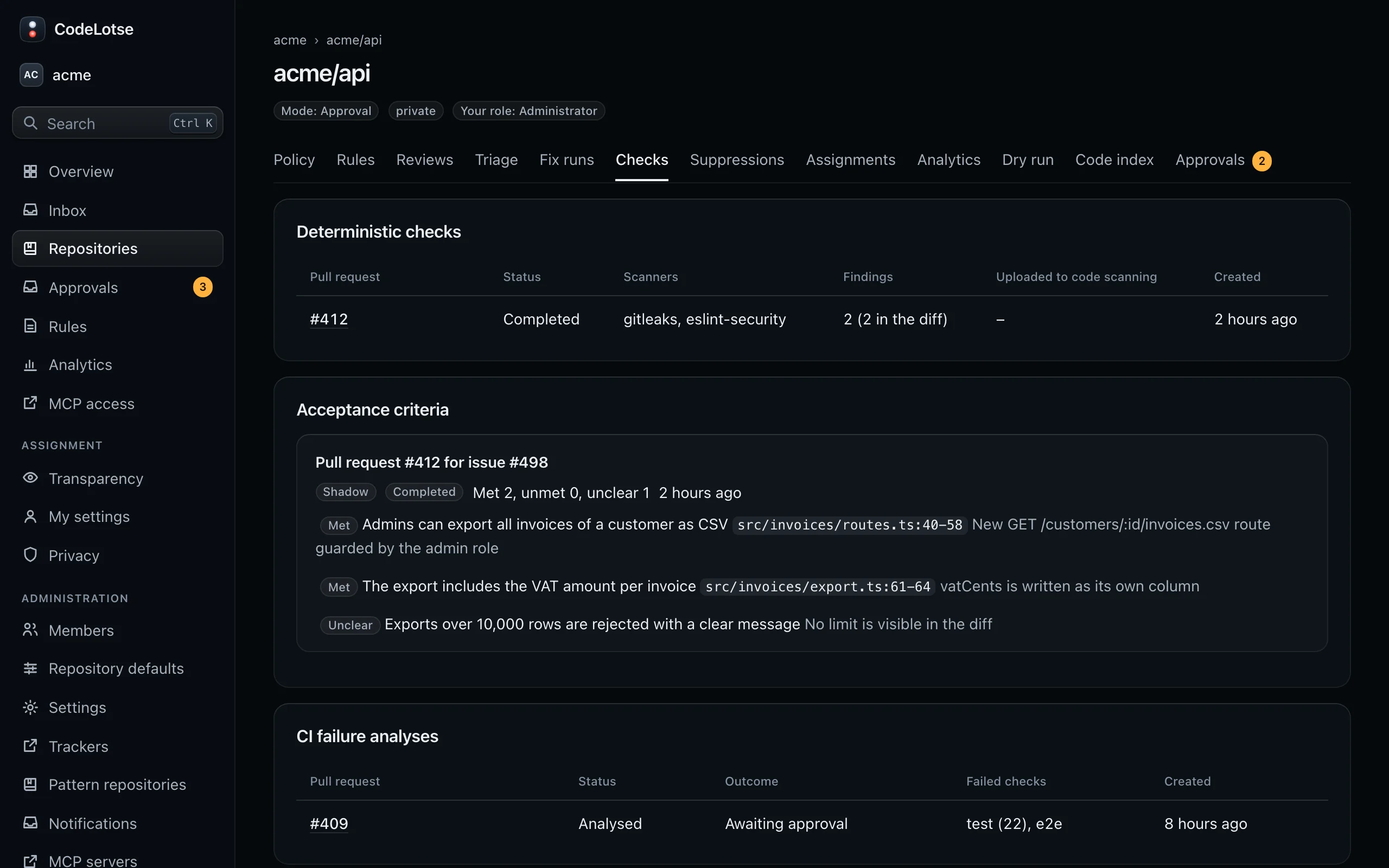
Checks › Deterministic checks lists every scanner run with the pull request, its Status (Completed, Partial, Skipped or Failed), the Scanners, the number of Findings and how many are in the diff, and whether it was Uploaded to code scanning. Select a run to see each finding with its scanner, rule, path, severity, message and whether it is In the diff.
Acceptance criteria ​
The acceptance criteria check compares a pull request with the acceptance criteria of the issues it links and reports each criterion as Met, Unmet or Unclear, with evidence from the diff. It never blocks a merge.
How a pull request links an issue ​
Up to three issues of the same repository are linked from:
- closing references the code host knows, and keywords in the description such as
Closes #12,Fixes #12orResolves #12; - a branch name that starts with the issue number and a dash, such as
12-billing-endpoint, or ends with a dash and the number.
With a tracker connected, tracker issues are linked as well: a key such as ABC-123 in the pull request title or branch name (Jira, Linear), or AB#123 in the title or description (Azure Boards).
Where criteria come from ​
- A section of the issue titled "Acceptance criteria", "Definition of done", "AC" or "Akzeptanzkriterien", a checklist, or Given/When/Then scenarios.
- A field of the tracker issue, when the tracker connection names one.
- When the issue has none and Infer criteria when the issue has none is on, CodeLotse derives criteria from the issue text and marks them as inferred.
Turn it on ​
Set Acceptance criteria in the repository policy:
| Setting | Default | Meaning |
|---|---|---|
| Acceptance criteria mode | Shadow | Shadow shows results on the Checks tab only. On adds them to the review summary and the status on the head commit. |
| Infer criteria when the issue has none | On | See above. |
| Maximum criteria per issue | 15 | Further criteria are ignored. |
| Report a check run | On | Shows the result in the status on the head commit. |
The check runs with every review of a pull request that links an issue with criteria. It works on GitHub and GitLab, and through tracker links on other code hosts (feature parity).
See the results ​
Checks › Acceptance criteria lists each check as "Pull request #… for issue #…" (or the tracker key) with the counts "Met, unmet, unclear". Open criteria make the review state "Worth a look: acceptance criteria to check" even when there are no findings.
CI failure analyses ​
When a check of a pull request fails, CodeLotse can explain why. The results are under Checks › CI failure analyses. See CI failure analysis.