
Instance administration ​
Instance administrators run a self-hosted CodeLotse instance from the web app: they register GitHub Apps, add identity providers, decide on usage statistics, record the legal sign-off for reviewer suggestions and watch evaluation runs. Their pages are at the end of the Administration section of the sidebar. In the cloud edition, the operator does this for you.
Being instance administrator is separate from administering an organisation. Organisation settings, model keys and repositories are covered in Organisation settings.
Become instance administrator ​
The first person who signs in through the setup link becomes instance administrator (Quickstart).
An operator makes further people instance administrators after their first sign-in:
sh./deploy/compose/quavon grant-instance-admin --login octocat ./deploy/compose/quavon grant-instance-admin --provider oidc --issuer https://idp.example.com/realms/acme --login janeWhen nobody can sign in as instance administrator any more, for example after the GitHub App was deleted, the operator uses
./deploy/compose/quavon break-glass. It prints a one-time link valid for 15 minutes; the session shows as Emergency access, is limited to Instance settings and Legal sign-off, and expires after one hour (Break-glass access).
Instance overview ​
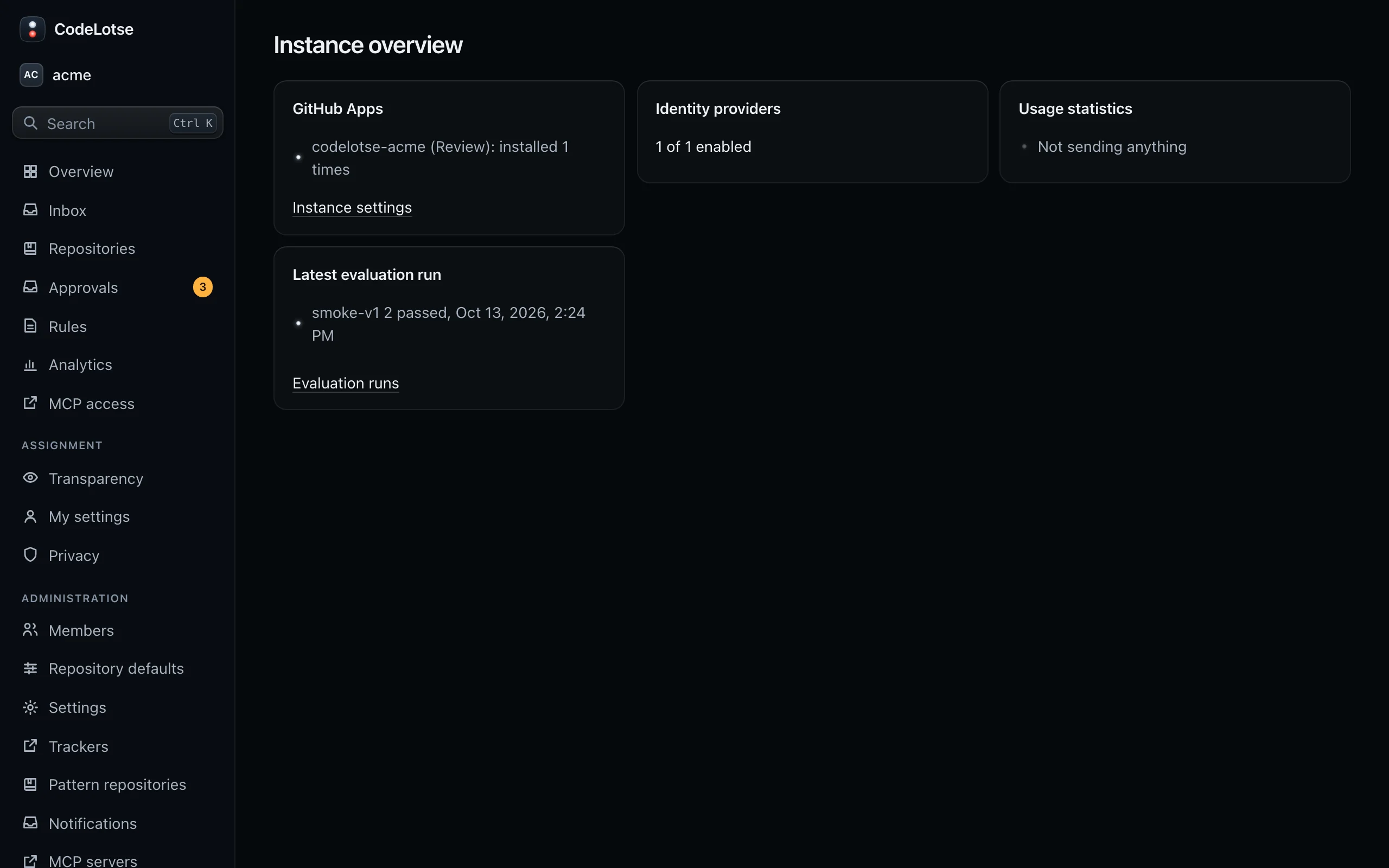
Instance overview shows the state of the instance on one page:
| Card | Content |
|---|---|
| GitHub Apps | Each app with its purpose and how many times it is installed |
| Identity providers | How many providers are enabled |
| Usage statistics | Whether reports are sent |
| Latest evaluation run | Dataset, version and whether it passed |
Setup reopens the setup steps with their state. CodeLotse sends instance administrators there automatically while setup is incomplete.
GitHub Apps ​
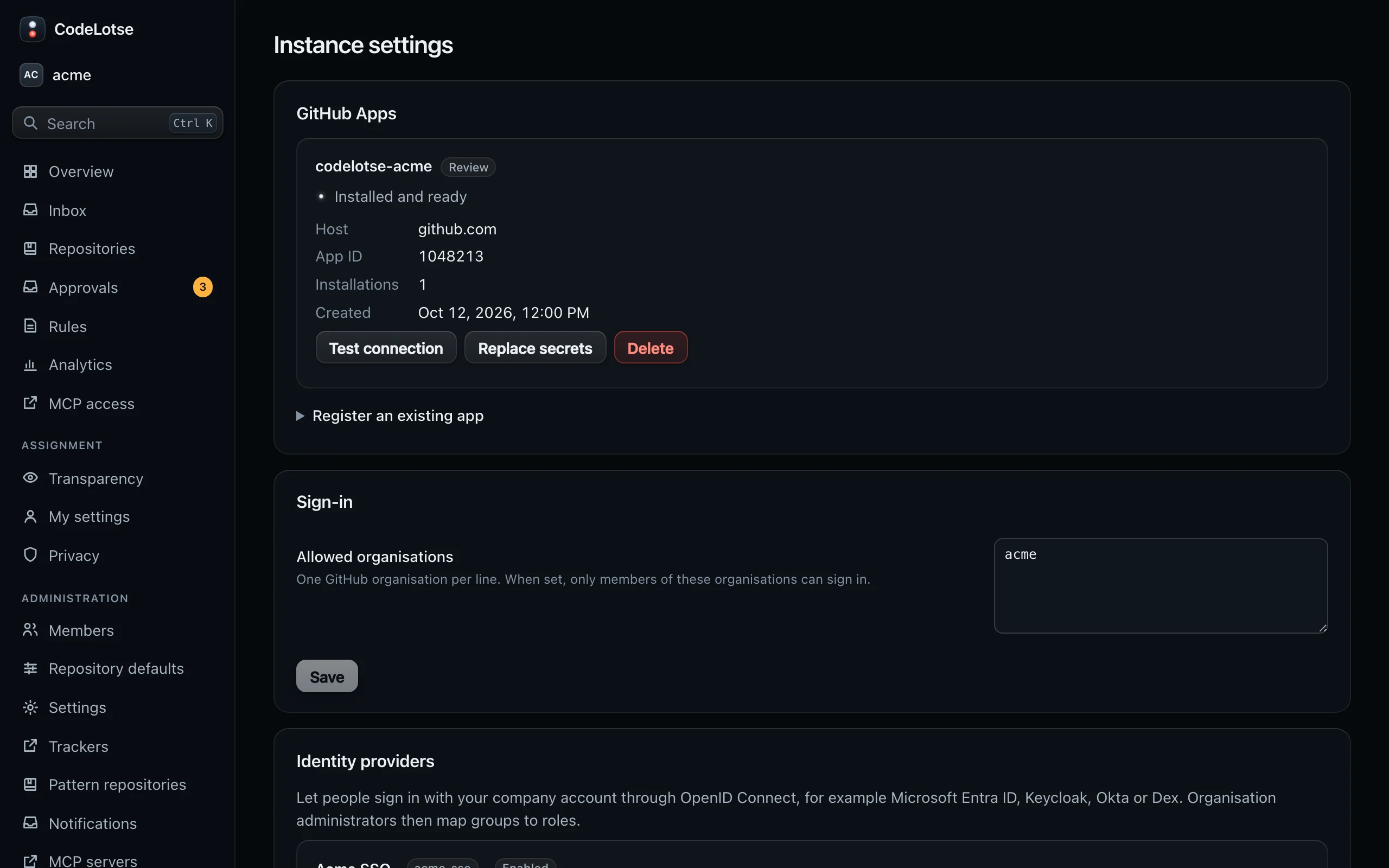
Instance settings › GitHub Apps lists every registered app with its state: Installed and ready, Not installed yet or The last connection test failed, and the host, app ID, installations and creation date.
| Action | Effect |
|---|---|
| Install on GitHub | Opens GitHub to install the app on more organisations or repositories. |
| Test connection | Checks the app credentials with GitHub. |
| Replace secrets | Enter only the secrets you want to replace, for example after rotating the private key on GitHub. |
| Delete | Removes the app. Its installations stop working. |
| Register an existing app | Adds an app you created on GitHub yourself: GitHub URL, Purpose, App ID, Client ID, Client secret, Private key (PEM) and Webhook secret (at least 16 characters). |
The Purpose is either Review or Fixer:
- The Review app does reviews, triage, replies, commands and assignment. It never gets write access to code. The setup wizard creates it.
- The Fixer app is only for draft fixes. It needs Contents: read and write, Pull requests: read and write and Metadata: read, subscribes to no events, and is installed only on repositories that use fixes. The setup wizard does not create it: create it on GitHub, then add it here with Register an existing app and the purpose Fixer.
Optional permissions such as Code scanning alerts: write for SARIF uploads or Actions: read for CI failure analysis are added to the app on GitHub; each installation owner then approves the change (Code hosts).
Sign-in ​
Instance settings › Sign-in › Allowed organisations limits who can sign in with GitHub: one GitHub organisation per line. When set, only members of these organisations can sign in. Leave it empty to let anyone sign in with GitHub; people still see only what their GitHub access allows.
Identity providers ​
Instance settings › Identity providers lets people sign in with their company account through OpenID Connect, for example Microsoft Entra ID, Keycloak, Okta or Dex.
- Select Add identity provider and enter the Short name (part of the sign-in address, cannot be changed later), the Display name for the sign-in button, the Issuer URL, the Client ID and Client secret, the Scopes, the User name claim and the Groups claim.
- Under Organisation, bind the provider to one organisation or let every organisation map its groups.
- Register the Redirect URI shown on the page at your identity provider, exactly as shown.
- Select Test connection. It checks the discovery document, the issuer, https endpoints, signing keys, PKCE with S256, the authorisation code flow and the advertised scopes and claims.
- Organisation administrators then map groups to roles under Sign-in groups.
Disable ends the provider's sessions with the next request; deleting it ends them at once. Provider-specific notes are in SSO / OIDC.
Usage statistics ​
Instance settings › Usage statistics can send a small anonymous report once a week to help improve CodeLotse. It is off by default and can only be turned on when the operator configured a receiving address. The page shows the exact report that would be sent; it never contains names of organisations, repositories or people, code, comments, findings, addresses or secrets. Tick I reviewed the report and want to send it once a week and select Turn on; Turn off stops it. See Telemetry.
Legal sign-off ​
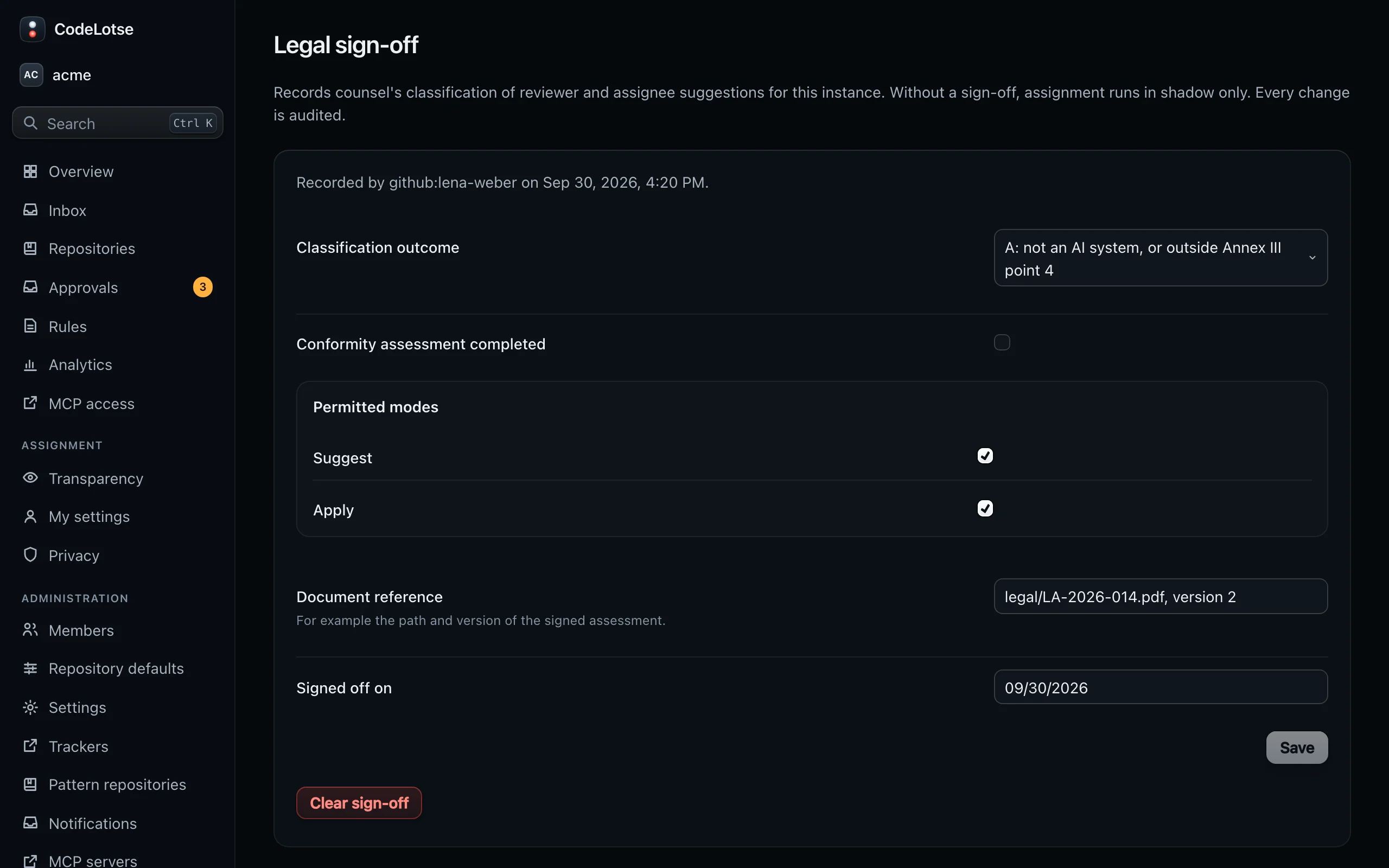
Legal sign-off records counsel's classification of reviewer and assignee suggestions for the instance. Without it, assignment runs in shadow at most in every organisation.
| Field | Meaning |
|---|---|
| Classification outcome | A: not an AI system, or outside Annex III point 4. B: Annex III point 4 with the Art. 6(3) derogation; apply is not permitted. C: high-risk AI system; apply only after the conformity assessment. |
| Conformity assessment completed | For outcome C. |
| Permitted modes | Suggest and Apply, within what the outcome allows. |
| Document reference | For example the path and version of the signed assessment. |
| Signed off on | The date of the sign-off. |
Every change is audited. Clear sign-off records an empty sign-off and returns every repository to shadow. Complete the legal assessment with counsel, and in Germany with the works council, before you record it. Organisation administrators continue with Assignment and privacy.
Evaluation runs ​
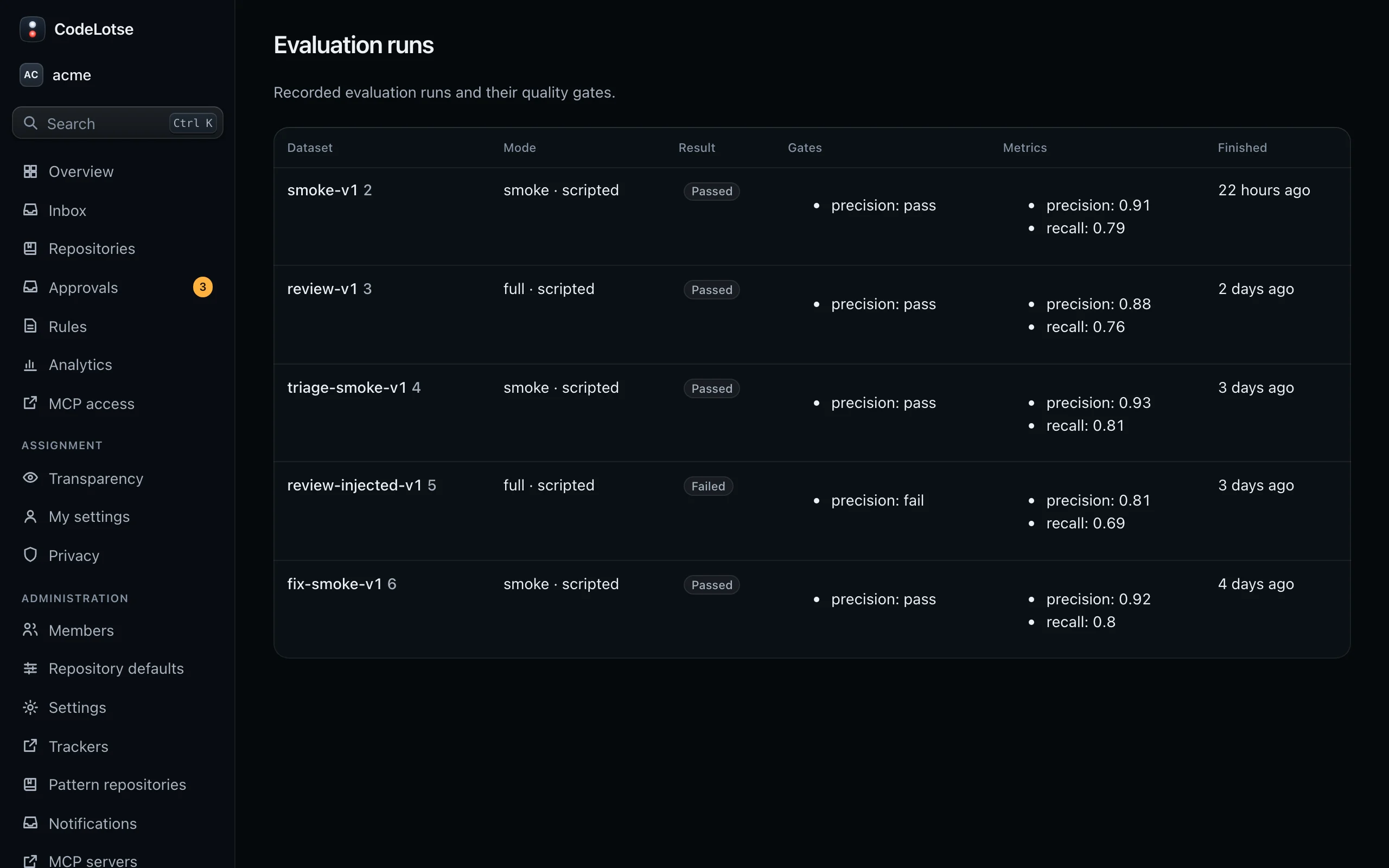
Evaluation runs lists recorded runs of the evaluation suite with their Dataset, Mode, Result (Passed or Failed), Gates and Metrics. Runs appear after quavon eval full --record-db. Use them to check the quality of the prompts and models you run before you move repositories from shadow to approval or automatic (Running a pilot).
Operating the instance ​
Everything outside the web app, such as upgrades, backups, key rotation, logs and monitoring, is in the operations guides: