
CodeLotse on your phone ​
CodeLotse is an installable web app. Add it to your home screen and turn on push notifications to be told when something needs you. There is no app-store app; the installed app is the same web app with its own window and icon.
Install ​
| Device | How |
|---|---|
| iPhone and iPad (iOS / iPadOS 16.4 or later) | Open your CodeLotse address in Safari, tap Share, then Add to Home Screen |
| Android | Open CodeLotse in Chrome, Edge or Firefox and choose Install app or Add to Home screen from the menu |
| Desktop Chrome or Edge | Use the install icon in the address bar |
You stay signed in with your normal CodeLotse sign-in. Sessions end after eight hours, as in the browser.
Turn on notifications ​
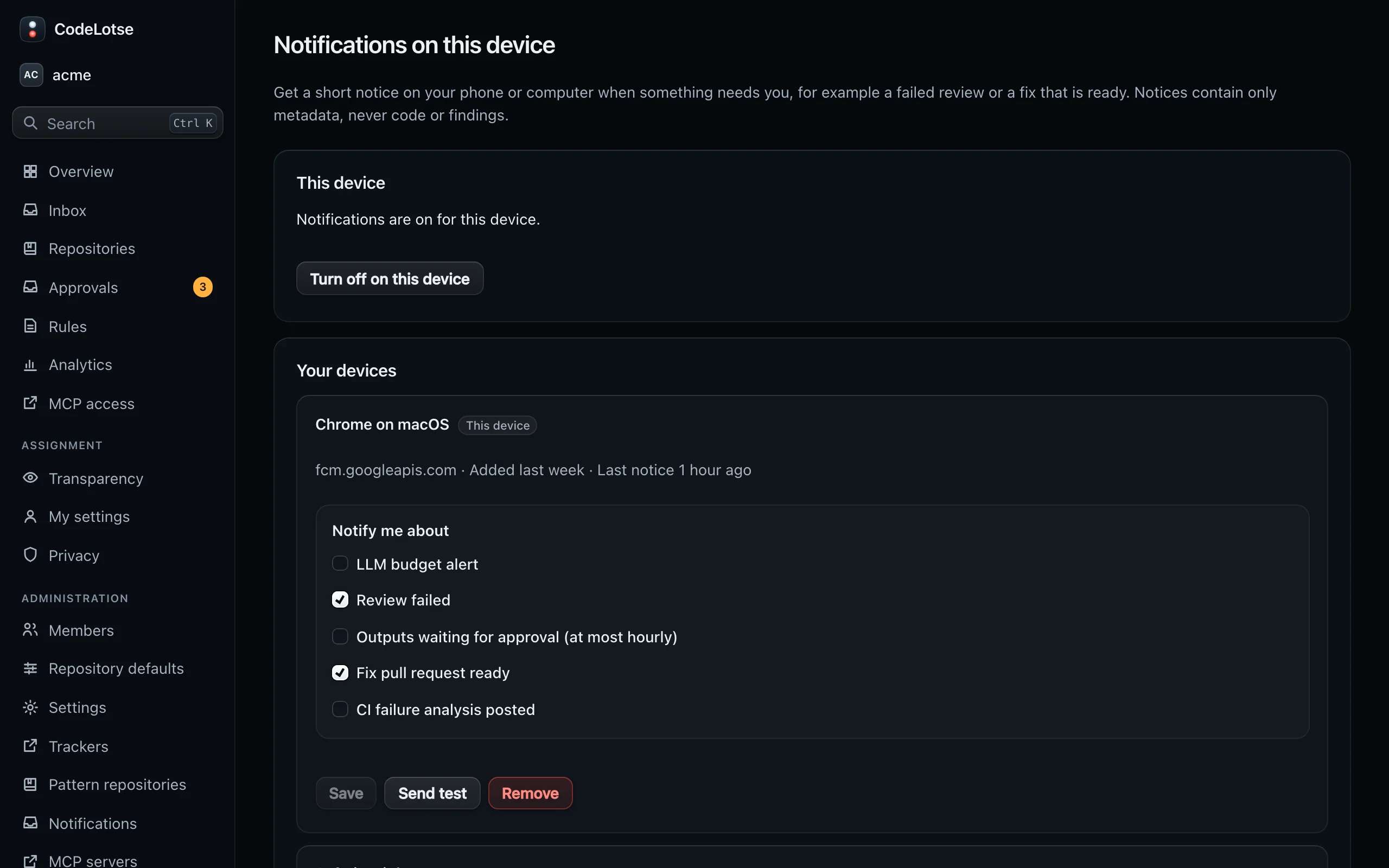
- Open the organisation, then the account menu at the bottom of the sidebar, and choose Notifications on this device.
- Choose Turn on notifications and allow notifications when the browser asks. On iPhone and iPad this only works in the installed app, not in a Safari tab.
- Pick the events you want.
- Use Send test to check that a notification arrives.
Each device and each organisation is set up separately. The screen lists all your devices for the organisation under Your devices; Remove the ones you no longer use.
| Event | Who receives it |
|---|---|
| Review failed, fix pull request ready, CI failure analysis posted | Organisation administrators and people with a role on the repository |
| LLM budget alert, outputs waiting for approval | Organisation administrators |
Notifications contain the event, the repository, the pull request number and title or a count. They never contain code, findings or model output. Tapping a notification opens the matching page in CodeLotse.
If you have not used CodeLotse for seven days, notifications pause until you open it again. This makes sure only people who still have access are notified.
Turn off ​
Choose Turn off on this device, or block notifications for the site in your browser or phone settings. Signing out also stops notifications on that device.
Troubleshooting ​
| Symptom | Cause |
|---|---|
| "Notifications are not set up on this instance" | An administrator has to configure push; see notifications |
| On iPhone the button tells you to add CodeLotse to the home screen | iOS allows push only for installed web apps |
| "Notifications are blocked for this site" | Allow notifications for the CodeLotse site in the browser or system settings |
| Test works but events do not arrive | You subscribed to other events, you have no role on the repository, or you have not used CodeLotse for seven days |